TL; DR
If you’re evaluating the features of HR software for your business, the ones you pick will define how well your HR team operates on a day-to-day basis. This guide breaks down the 8 non-negotiable HR software modules – from core HR and payroll compliance to ESS and analytics. Each section tells you what good looks like, what India-specific compliance requirements to check, and what to test during a vendor demo. If you’re short on time, jump directly to the module that matters most to your business right now.
Gone are the days when HR managers used to be satisfied with tools that had basic features.
It’s 2026, and the workplace operations have skyrocketed like never before. HR managers, C-level executives, and MSME founders won’t settle for anything basic, especially in the Indian environment where labor laws and compliance requirements keep changing.
Whenever any Features of HR software vendor tries to approach the business for selling the product, in most cases now, the prospective customers often ask – Are the features of HR software basic, moderate, or advanced in nature?
But what about businesses that don’t know how to evaluate the features of HR software? Don’t worry, because this guide will give you the complete insight you need regarding the software’s features, so that you can have the best solution for your business!
These 8 HRMS modules are something that every platform must have!
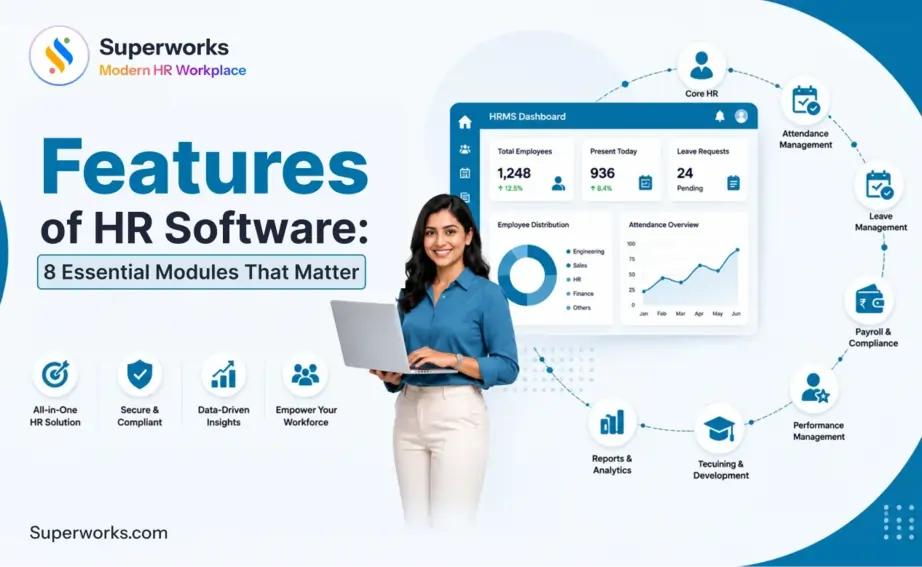
Now, before moving forward, here is a quick overview of the 8 HRMS modules of an HRMS software:
- Core HR
- Attendance management
- Leave management
- Payroll & compliance
- Employee Self-Service (ESS)
- Performance management
- Recruitment & onboarding
- Analytics & reporting
Module 1: Core HR features
What it covers:
Core HR is the primary feature of HR software. A centralized platform that automates, digitizes, stores, and organizes your employees’ data. This ranges from their joining date and designation to PF bank details and reporting structure. In addition to this, it also takes care of the entire employee lifecycle, from hiring to retiring, including payroll processing.
So, what does types of hrms software do at the core level? Simple – it replaces repetitive tasks and reduces administrative burden with a smart platform that contains all the workforce’s data.
What good looks like:
- Complete employee details with personal, professional, statutory, and payroll details in one place
- Complete employee lifecycle management
- An organization chart that updates automatically whenever there is a change
- Role-based access control so sensitive data is only visible to authorized users
- Document management with digital storage.
- Configurable fields that allow you to capture data specific to your industry or organization structure
India compliance:
Since these feed directly into payroll and statutory filings, Core HRMS must store PF number, ESIC number, PAN, Aadhaar, and bank account details accurately.
What to watch for in demos:
Ask the vendor to show you what happens when an employee is transferred across departments or locations.
Module 2: Time & attendance features
What it covers:
Attendance management is another critical feature of HR software. It tracks when employees clock in, clock out, take breaks, work overtime, leave, and shifts, etc. Just like any business in any country, Indian businesses ensure that the system has accurate attendance data of employees. This is because it will go into the payroll, and one mistake here will impact the salaries of employees. Effective time tracking is also an essential tool for managers who oversee remote employees or distributed teams, where manual oversight simply isn’t possible.
What good looks like:
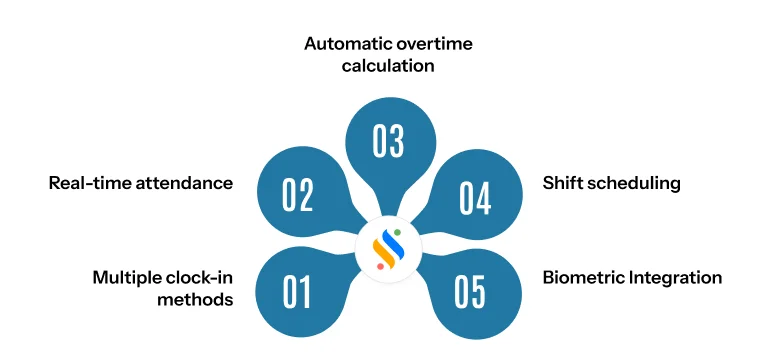
- Multiple clock-in methods — biometric devices, mobile app, geo-fencing, IP-based punch-in, and facial recognition
- Real-time attendance dashboards visible to HR, managers, and employees simultaneously.
- Automatic overtime calculation based on configurable shift rules.
- Regularization workflows — employees can request corrections, and managers can approve with an audit trail.
- Offline sync capability for biometric devices in locations with unstable internet.
- Integration with shift scheduling so roster changes reflect in attendance automatically.
India compliance mapping:
The S&E Act requires businesses to maintain attendance registers for all employees. A good HRMS auto-generates compliant attendance registers that are audit-ready whenever needed.
What to watch for in demos:
Test how the system handles half-days, late arrivals, early departures, and missed punches. Doing this will expose whether the attendance engine is genuinely automated or not.
Module 3: Leave management features
What it covers:
Leave management system handles everything from policy configuration to request submission, manager approval, balance tracking, and payroll integration for unpaid leave deductions.
What good looks like:
- Configurable leave types
- State-wise leave policy configuration
- Multi-level approval workflows
- Real-time leave balance visibility for the entire workforce
- Holiday calendar management with location-wise or department-wise holiday lists
- The approved leaves will get reflected in salary calculations without manual input, thanks to payroll integration.
India compliance mapping:
Earned leave entitlements vary. A system that only supports a single national leave policy will create Hr compliance software for businesses operating across multiple states. Verify that the vendor supports state-wise leave rules natively.
What to watch for in demos:
Ask the vendor to configure a leave policy with different encashment rules for different employee grades. If this requires configuration by their team rather than self-service by your HR, it will slow down every future policy change.
Module 4: Payroll & Compliance Features
What it covers:
Payroll is the most business-critical features of HR software. It calculates gross salary, applies all statutory deductions, arrives at net pay, generates payslips, and prepares statutory filings — all without manual intervention.
For Indian businesses, types of hrms software is also more compliance in depth matters which matters the most. A payroll engine that does not natively handle India’s statutory requirements is not an HRMS — it is a liability.
What good looks like:
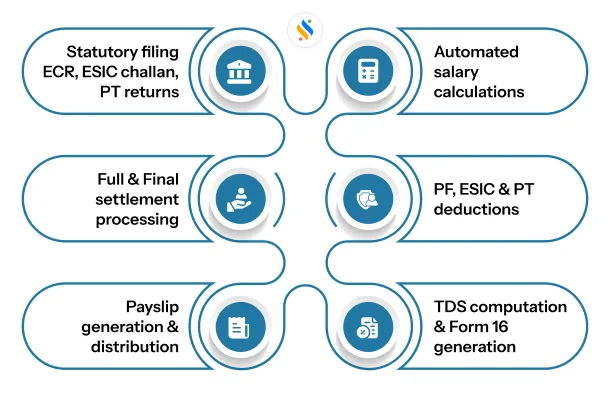
- Automated gross-to-net salary calculation for every employee, every month.
- Native PF calculation – both employee and employer contributions, ECR file generation, and UAN management.
- ESIC calculation and challan generation for eligible employees.
- Professional Tax deduction with state-wise PT slabs configured natively.
- TDS calculation with Form 16, Form 24Q, and quarterly return generation.
- Payslip generation in a format that complies with the Payment of Wages Act.
- Full and Final settlement calculation for exiting employees.
- Salary revision workflows that update salary structures without affecting historical payroll data.
India compliance mapping:
This module must cover PF, ESIC, PT, TDS, and GST (for reimbursements processed through the system). Any vendor claiming India compliance should be able to demonstrate live ECR file generation and ESIC challan output — not just tell you it supports these features.
What to watch for in demos:
Run a full payroll cycle during the demo using sample data with at least 3 different salary structures. Ask the vendor to show you the ECR file output and verify if it matches the EPFO portal format. If they cannot show this live, it is a red flag.
Module 5: Employee self-service & helpdesk features
What it covers:
Among all the features of HR software, the employee self-service portal is the one that employees interact with daily. It empowers employees to handle basic HR tasks independently, without relying on HR staff for every small request. This reduces the administrative burden on HR teams while simultaneously improving employee engagement and satisfaction. With self-service tools in place, employees can perform certain tasks on their own, whether they work from the office or remotely.
What good looks like:
- Mobile access.
- Payslip and Form 16 download without HR intervention
- Leave application, approval, and balance tracking within the app.
- Attendance regularization requests with document upload support.
- IT and HR helpdesk ticketing system with SLA tracking
- Investment declaration and tax-saving submission during appraisal cycles
- Multilingual support for frontline or non-English-speaking employees
In practice, this mobile access usually takes the shape of a dedicated HR App for Employees, giving staff one place to check attendance, apply for leave, and download payslips right from their phones.
India compliance mapping:
Under the Payment of Wages Act, employers are required to provide wage slips to employees. A digital payslip delivered through the ESS portal satisfies this requirement — provided the format meets the Act’s specifications.
What to watch for in demos:
Have someone from your non-HR team test the mobile app during the pilot. HR teams often rate ESS portals higher than employees do because they are evaluating it from an admin perspective, not a user perspective.
Don’t know which features you want in your HRMS software?
Check out our 8 modules that will help you get the best HR software
Module 6: Performance management features
What it covers:
Performance management handles goal setting, continuous feedback, mid-year reviews, annual appraisals, and compensation recommendations, all within a structured, documented workflow. While not always the first thing businesses think about when reviewing features of HR software, it directly affects employee engagement, compensation fairness, and talent management outcomes across your organization.
What good looks like:
- Goal-setting frameworks
- Continuous feedback capability
- 360° feedback with peer, manager, and self-assessment components
- Appraisal cycle management
India compliance mapping:
While performance management does not have direct statutory compliance requirements, it indirectly affects compliance through variable pay calculations, increment letters, and promotion documentation — all of which need to be audit-ready.
What to watch for in demos:
Ask the vendor how long it takes to configure and launch an appraisal cycle for a 200-person organization. If the answer involves their implementation team doing it for you, the system is not designed for HR self-service.
Module 7: Recruitment & onboarding
What it covers:
Recruitment and onboarding features of HR software cover the full hiring workflow, from sourcing candidates to structuring the onboarding of new employees. As part of the broader features of HR software, this module ensures that every new hire enters the organization with the right documentation, access, and compliance setup from day one.
A robust and smart applicant tracking system (ATS) also streamlines the hiring process, helping HR professionals reduce time-to-hire and improve the quality of candidate screening, especially important for growing SMBs that need to scale quickly.
What good looks like:
- Applicant tracking system (ATS) with resume parsing and candidate ranking
- Structured interview scorecards with feedback collection
- Offer letter generation with configurable templates
- Digital document collection during onboarding — no physical paperwork
- Pre-boarding access for new hires before their joining date
- Automated onboarding task lists assigned to the right employee
- Offboarding workflows with a full and final settlement trigger
India compliance mapping:
Onboarding must capture PAN, Aadhaar (with DPDP Act consent), PF nomination, ESIC registration, and professional tax enrollment for new hires — all within the first week of joining. A system that does not automate this creates compliance issues from day one.
What to watch for in demos:
Ask the vendor to walk through a complete onboarding workflow from offer acceptance to the first payroll cycle.
Module 8: Analytics & Reporting Features
What it covers:
Analytics and reporting are among the most forward-looking features of HR software available today. They provide real-time visibility into workforce data, including headcount, attrition, absenteeism, payroll costs, hiring pipeline, and performance distribution.
For HR professionals, the shift from reactive reporting to proactive HR analytics is what separates strategic HR from administrative ones. When HR data is organized, accessible, and actionable, HR teams can contribute meaningfully to business decisions.
What good looks like:
- Pre-built dashboards covering the most common HR metrics.
- Custom report builder that HR can use without IT support.
- Scheduled reports delivered automatically to stakeholders.
- Attrition analysis with department-wise and tenure-wise breakdowns.
- Payroll cost analytics with cost-per-department and month-on-month variance.
- PF, ESIC, PT, TDS, and other compliance reports in statutory filing format.
- Easy to export data in multiple formats.
India compliance mapping:
Analytics should proactively surface compliance gaps – such as employees approaching PF contribution limits, ESIC eligibility changes triggered by salary thresholds, or PT slab changes resulting from salary revisions. A reactive reporting system that only shows you what happened is not sufficient.
What to watch for in demos:
Ask the vendor to generate a department-wise attrition report filtered by tenure band for the last 6 months. This tests both the depth of the data model and the usability of the report builder.
Features comparison:
Let’s compare the features of HRMS software the best ones in the market right now!
| HRMS Software Features | Super HRMS | HROne | greytHR | Keka | Zoho People |
|---|
| Core HR | Advanced | Advanced | Strong | Advanced | Advanced |
| Payroll & compliance | Advanced | Advanced | Strong | Advanced | Basic |
| Attendance management | Advanced | Advanced | Advanced | Advanced | Strong |
| Leave management | Advanced | Advanced | Strong | Advanced | Strong |
| Employee self-service (ESS) | Advanced | Advanced | Advanced | Advanced | Advanced |
| Recruitment / ATS | Advanced | Advanced | Advanced | Advanced | Limited |
| Performance management | Advanced | Advanced | Moderate | Advanced | Advanced |
| Analytics & reporting | Advanced | Advanced | Advanced | Advanced | Advanced |
| Geo-fencing / Mobile attendance | Advanced | Advanced | Advanced | Advanced | Advanced |
| Biometric integration | Advanced | Advanced | Advanced | Advanced | Advanced |
| Shift & roster management | Advanced | Advanced | Advanced | Advanced | Advanced |
| Statutory compliance | Advanced | Advanced | Advanced | Advanced | Advanced |
| Workflow automation | Advanced | Strong | Strong | Advanced | Advanced |
| Responsiveness | Strong (App available) | Advanced | Advanced | Advanced | Advanced |
| Scalable | Strong (MSME focus) | Strong | Strong | Strong | Advanced |
Conclusion
Just as any software’s value is defined by its capabilities, the features of HR software you choose will determine how effectively your HR team operates. Modern HR software is no longer just a tool for storing employee records or running payroll — it has become the operational backbone that supports streamlined processes, compliance management, employee engagement, and strategic decision-making across the entire organization.
The shift to cloud based hrm software is particularly significant for Indian businesses. Unlike traditional tools built around physical files and manual registers, today’s HRMS platforms bring together core HR, payroll, attendance, and talent management into one integrated system – eliminating data silos, reducing administrative tasks, and giving HR professionals the visibility they need to manage employees effectively.
While the HRMS capabilities of many platforms may look impressive on paper, the real difference lies in how well these features of HR software address the specific needs of HRMS software in india businesses – from state-wise leave compliance and statutory filings to multilingual support and mobile-first self-service for frontline workers.
This is where Super HRMS, a product of Superworks, stands out. Whether you want to streamline attendance management, leave management, or shift management, Super HRMS delivers everything discussed in this guide — and it seamlessly integrates with Super Payroll, making your entire HR operations more efficient and compliant from day one.
If you’re still evaluating your options, it helps to first understand what is HRMS software — knowing the core purpose and capabilities of HRMS will help you make a more informed decision when choosing the right features for your business.
Get Super HRMS for your business today. Book your demo!
Now that you have a clear understanding of the key HR software features, the next step is to learn How to Choose HRMS Software that matches your specific modules, compliance needs, and business size — so you can select a platform that truly works for your team.










