TL; DR
Most employee monitoring tools claim Linux support, but few actually deliver it without glitches, missing features, or added setup friction. This blog breaks down the top employee monitoring software for Linux, what each does well, where they fall short, and what to actually look for before buying. If your team runs on Ubuntu or any other Linux systems, this one is for you.
When it comes to picking an employee monitoring software for business, Windows and macOS get all the love.
If you observe the market of employee monitoring software carefully, you will realize that the priority of most vendors is those two platforms, while Linux for them is more or less an afterthought.
As a result, there is limited support, and in some cases, vendors present their software simply as “Linux compatible.”
But today, Linux isn’t something that one can ignore. Tech companies, IT departments, development teams, and an increasing number of Indian SMBs rely on Linux for day-to-day operations.
And that’s why, when you’re managing a team of engineers or developers running Ubuntu or Fedora, you need user activity monitoring software for Linux that actually works, not one that is simply “compatible.
This guide cuts through the noise and gives all the details you need for employee monitoring software for Linux. Apart from this, we will also give you the list of 6 tools that are best in the business right now! So, let’s jump right in!
What really matters when it comes to picking an employee monitoring software for Linux?
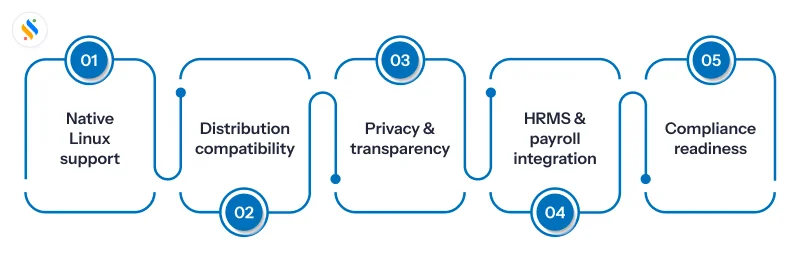
We often jump straight to comparing tools, and this is where we make our first mistake. See, it is fair to compare tools, because that’s the only way you can have the best one. However, what matters more than that is your evaluation criteria. It is because when you’re managing a Linux-heavy team, you should be aware of what you are looking for:
Native Linux agent, not a workaround:
Some user activity monitoring tools for Linux only “support” it through a browser extension. But that can’t be counted as a real monitoring tool. A proper Linux agent should auto-launch, run in the background, and sync data without requiring an IT member to babysit it.
Distribution compatibility:
“Linux support” means nothing unless the vendor specifies which distributions they support. Ubuntu LTS, Debian, Fedora, and Red Hat are the most common enterprise ones. If your team runs something less mainstream, verify before committing.
Privacy & transparency:
Linux users are known for valuing privacy. This means that any unregulated surveillance will get spotted quickly. The employee monitoring tool should be compliant and transparent, so that it becomes clear what needs to be collected/recorded and what not.
Integration with your HRMS or payroll:
A monitoring tool that sits in isolation is only half useful. If attendance data, idle time, and work hour reports can’t feed into your existing HR system, you’re creating manual reconciliation work for your team.
Compliance readiness:
For Indian businesses, this means data stored securely, clear audit trails, and the ability to configure what gets monitored so you stay on the right side of employee privacy expectations.
Not sure which employee monitoring software for Linux is best for you?
One software handles real-time activity tracking, app monitoring, and more.
Top employee monitoring software for Linux in 2026
6. Hubstaff
At number six, we have Hubstaff. This software has native Linux support across distributions, including Ubuntu, Debian, Fedora, Red Hat, and more. The desktop agent runs in the background, logs hours against projects, and tracks keyboard and mouse activities. Managers get screenshots, app/URL tracking, and a real-time dashboard with timesheets.
Where Hubstaff shines is in field workforce management. Its GPS tracking, shift scheduling, and payroll integration make it a strong choice for distributed teams that mix desk and mobile workers. The Linux app covers the desk side of that equation well.
Pricing:
Starter plan: $7/user/month.
Grow plan: $9/user/month.
Team plan: $12/user/month.
Enterprise plan: $25/user/month.
5. Time Champ
At number five is Time Champ. TimeCamp offers a desktop agent for Linux alongside Windows and Mac. It tracks time automatically using keyword-based rules, logs app and website usage, and syncs data across devices, including offline sessions. Project-level time allocation, invoicing, and budget tracking make it a practical choice for agencies and service businesses.
TimeCamp positions itself as a time tracking platform with monitoring capabilities built in. For teams where logging hours and managing project costs is the primary goal, that’s a good fit. Teams with a heavier focus on user activity monitoring and productivity analytics may want to explore tools with a deeper feature set on that front.
Pricing:
The annual prices are,
Starter plan: ₹200 per user/month.
Professional plan: ₹300 per user/month.
Enterprise plan: ₹550 per user/month.
The quarterly prices are,
Starter plan: ₹300 per user/month.
Professional plan: ₹600 per user/month.
Enterprise plan: ₹1200 per user/month.
4. DeskTime
At number three on this list is DeskTime. This software tracks app usage, website visits, and document titles, categorising each as productive, unproductive, or neutral based on rules you configure. The Linux desktop app is available and integrates well with Ubuntu LTS environments.
One of DeskTime’s major differentiators is document title tracking – no other competitor at this price point records the specific name of the file or email an employee has open. It also has a Private Time mode that lets employees pause tracking without managers seeing what they’re doing – a feature that tends to reduce pushback when rolling out monitoring policies.
Pricing:
Pro (for small teams and startups): ₹366.67 per user/month.
Premium (for hybrid and growing teams): ₹513.33 per user/month.
Enterprise (for large organizations): Custom pricing.
3. Monitask
Monitask is third on this list. It is a cloud-based employee monitoring platform built around one central idea: proof of work. Employees clock in manually, and monitor activities only during those active hours; there is no surveillance or background tracking outside work time. That transparency tends to make employee adoption easier than with tools that run continuously.
Once clocked in, Monitask captures periodic screenshots at random or scheduled intervals, tracks keyboard and mouse activity to measure active vs idle time, logs app and website usage, and generates productivity reports that managers can access from any device in real time. Monitask supports Windows, macOS, and Linux.
Pricing:
Pro plan: $7.99 per user/month.
Business plan: $10.99 per user/month.
Business Premium plan: $15.99 per user/month.
Enterprise plan: Custom pricing.
2. Time Doctor
Next is Time Doctor. It has full desktop app support for Linux, including Ubuntu and Debian. It captures screenshots at set intervals, tracks app and website usage, and sends distraction alerts when employees spend too long on non-work sites. Managers get detailed productivity reports, and the tool integrates with payroll tools for hour-based payments.
Time Doctor is a robust monitoring and time tracking solution with full desktop app support for Linux (Ubuntu, Debian, etc.), enabling remote oversight of Linux-based teams alongside Windows and Mac users.
Pricing:
Basic plan: $6.67 user/month.
Standard plan: $11.67 user/month.
Premium plan: $16.70 user/month.
Enterprise plan: Custom pricing.
1. Super Track
And finally, at number one, we have Super Track. One of the most robust modules in the Superworks’ ecosystem, Super Track is an employee monitoring software and perhaps the most preferred tool among Indian SMBs, mid-sized businesses, and growing enterprises. For HR teams and managers in India who don’t want monitoring to be a separate, siloed tool, this tool is a game-changer.
Super Track tracks keyboard activity and mouse movements to identify genuine active time vs passive presence. It captures automatic screenshots at regular intervals, monitors which apps and websites employees use during work hours, and separates productive from unproductive digital behaviour — all in real time. Idle time reports, lock time logs, and missed screenshot alerts give managers granular visibility without needing to interpret raw data from multiple dashboards.
What makes it particularly relevant for the Indian market is the HRMS integration layer. Attendance data, active hours, and productivity reports feed directly into Superworks’ broader platform – which covers payroll, PMS, and HR operations. For SMB founders and HR leaders who are tired of reconciling data between a standalone monitoring tool and their HR system, that integration is a genuine operational advantage.
Super Track works for in-office, remote, and hybrid teams. The interface is clean and designed with ease of deployment in mind – teams are up and running without weeks of onboarding.
Pricing:
The following are the prices and plans of Super Track. However, it entirely depends on the number of employees:
Super Track
Professional plan: ₹399/user/month
Advanced plan: ₹499/user/month
Super HRMS + Super Track
Professional plan: ₹479/user/month
Advanced plan: ₹589/user/month
Super Project + Super Track
Professional plan: ₹849/user/month
Advanced plan: ₹949/user/month
Full suite (Super HRMS + Super Track + Super Project)
Professional plan: ₹949/user/month
Advanced plan: ₹1049/user/month
How to choose the right employee monitoring software for your Linux team?
The tool comparison above tells you what each product does. This section helps you figure out what you actually need before you make a call.
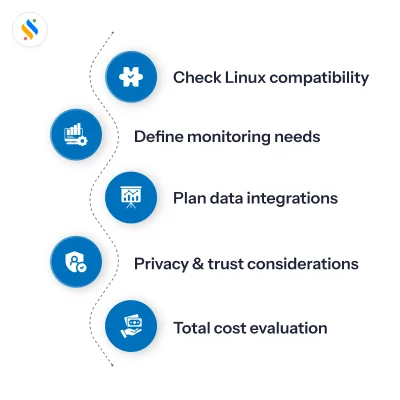
Start with your Linux environment:
Not all tools support every distribution. Before evaluating features or pricing, confirm that the vendor’s desktop agent runs on your specific setup – whether that’s Ubuntu LTS, Debian, Fedora, or something else. “Linux compatible” on a pricing page means nothing without that specificity.
Know whether you need monitoring or time tracking:
These are related but not the same thing. Time tracking tells you how many hours were logged. Employee monitoring tells you what was actually happening during those hours – which apps were open, which websites were visited, and how active or idle an employee was. If accountability and productivity visibility are your goals, you need the latter.
Think about where the data needs to go:
A monitoring tool that sits in isolation creates its own problem. If your HR team still has to manually reconcile monitoring reports with attendance records or payroll data, you’ve only moved the bottleneck. The right tool feeds into your existing HR and payroll workflow – not away from it.
Factor in your team’s tolerance for surveillance:
There’s a difference between monitoring that builds accountability and monitoring that kills trust. Features like Private Time mode, screenshot blurring, and employee-facing dashboards matter – especially for teams that will push back. Roll out something too aggressive without transparency, and you’ll spend more time managing resistance than reading reports.
Evaluate total cost honestly:
If you think that you will get everything you need at the entry-level pricing, then you are mistaken. Certain features, such as screenshots, advanced analytics, and integrations, often fall under higher price tiers. Get clarity on what the plan you can realistically afford actually includes before committing.
Conclusion
Linux is no longer an edge case, and the employee monitoring tools that treat it like one will cost you in accuracy, compatibility headaches, and missing data. The good news is that several credible options exist, each with a genuine Linux footprint and a distinct set of strengths.
But here’s what most comparison guides won’t tell you: the tool you pick isn’t just a monitoring decision. It’s an operations decision. How that data flows into your attendance records, your payroll runs, and your performance reviews determines whether you’ve actually solved a problem or just added another dashboard to manage.
That’s the gap Super Track was built to close.
For HR teams, managers, and SMB founders in India who are tired of stitching together a monitoring tool, a time tracking sheet, and a payroll system that don’t talk to each other, Super Track brings it all under one roof. Real-time screenshots, app and website tracking, active vs idle time reports, keyboard and mouse activity monitoring, and direct integration with your Super HRMS, Super Payroll, and Super Project. Not as separate modules, you pay extra for. As a single, connected platform.
Your Linux team is already doing the work. Super Track makes sure you can see it, measure it, and act on it.
But don’t have to take our word for it. Start your free trial of Super Track today and see exactly what your team’s workday looks like before you commit to anything.










