TL; DR
An attendance management system is an extremely effective solution. Why? Simply because it replaces manual ways of tracking the workforce’s attendance with smart automation. It captures clock-ins, clock-outs, breaks, leave, and overtime in real time. For growing Indian businesses, the right attendance system for employees cuts payroll errors, closes loopholes, and gives HR teams accurate data. This blog touches upon this and talks about it in detail.
For most organizations in India, the only way to manage the workforce’s attendance, even in the era of AI, is spreadsheets and registers. This is particularly true for small and mid-sized organizations. Now, from the outside, this might seem like a good practical approach. After all, the workforce headcount is still manageable.
But if you are an HR, a C-level executive, or a founder, chances are that you might be experiencing attendance-related challenges, particularly proxy attendance, time theft, etc.
Now, these aren’t just any other organizational problems. They often have a rippling effect on payroll processing and compliance management. Not to mention the amount of time HR spends fixing errors every month. On top of this, they have to put effort into reconciling missed punches, late arrivals, and whatnot.
The problem multiplies when employees work across different locations or shifts. Even a biometric machine only solves the attendance-capture part of the problem. HR still needs to process and make sense of that data.
This is where having an attendance software for employees becomes the need of the hour. Let’s understand in detail what it is exactly and what it does.
How does manual attendance tracking hold HR back?
If you are HR and your team still reconciles attendance registers and spreadsheets at month-end, you might be aware of the price: delayed salary processing, disputed working hours, and hours lost to fixing errors that shouldn’t exist in the first place. A single missed punch can snowball into a payroll grievance. A buddy clocking in for a colleague can quietly increase your payroll costs for months before anyone notices.
This is exactly the situation that demands an upgrade in your attendance management. An attendance management system for employees automatically collects, verifies, and logs attendance data – right from employees’ clock-in, taking breaks, and clock-out.
Not only that, all this data flows directly into the payroll platform. This way, payroll processing also becomes swift and accurate. All of this happens without the need for a single spreadsheet.
This means fewer disputes, faster payroll cycles, accurate attendance records with real-time data, and complete compliance guaranteed.
Attendance management system: Explained!
An attendance management system is a tool or software that is used to track, record, and manage employees – clock-ins/clock-outs, breaks, leaves, and working hours. The system does it without a single spreadsheet. Most modern attendance management systems are built-in in HRMS software. This way, it becomes easy to manage everything from one platform.
Types of attendance tracking methods businesses use
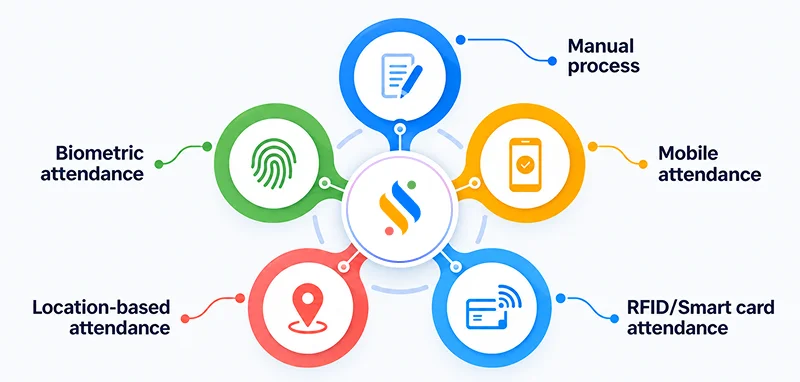
1. Manual process:
Registers where employees register their attendance by signing in the column next to their name. It’s the traditional way of managing attendance, but it creates issues like buddy-punching, illegible entries, etc. All this makes month-end reconciliation a headache.
2. Biometric attendance:
A biometric attendance system is usually the first upgrade businesses make once manual tracking stops scaling. Fingerprint or facial recognition devices are installed at entry gates. Employees need to put their face or thumb in front of the devices.
3. Mobile attendance:
Employees clock in and out through a mobile app. It’s built for remote and hybrid teams, letting HR track hours.
4. Location-based attendance:
GPS or geo-fencing confirms an employee is checking in from an approved site – a client location, a job site, a delivery zone. It’s the standard for field sales, service technicians, and logistics teams where “were they actually there” is the real question.
5. RFID/Smart card attendance:
Employees tap a badge or card at the entrance points. It’s common in larger organizations with multiple entry and exit points.
Replace attendance firefighting with a system that keeps up!
Capture accurate attendance and move clean data into payroll without the spreadsheet shuffle
Core features of an attendance management system
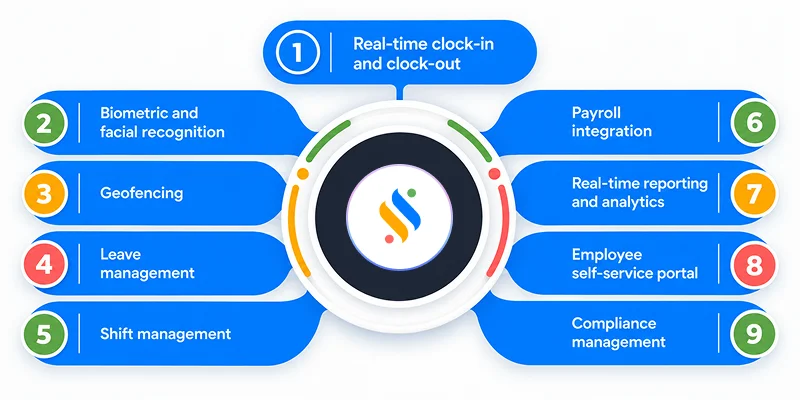
1. Real-time tracking of clock-in & clock-out:
Every punch is captured and visible the moment it happens, not batched and uploaded at day’s end. HR and managers see exactly who’s in, who’s late, and who hasn’t clocked in yet, without waiting for a report to run.
2. Biometric & facial recognition:
Fingerprint scans or facial recognition confirm the person clocking in is a real person. This single feature eliminates most proxy attendance issues easily.
3. Geofencing:
The system checks an employee’s location against an approved radius before accepting a check-in. For field teams, this confirms people are clocking in from where they say they are.
4. Leave management:
Leave requests, approvals, and balances live in the same system as attendance. This way, a sanctioned leave day automatically reflects in the attendance record instead of showing up as an unexplained absence.
5. Shift management:
Rotating shifts, split shifts, and night shifts get configured automatically. Employees see their schedules in advance, and the system flags conflicts before they become a problem.
6. Payroll integration:
Attendance, leave, and shift data should run on the same platform as payroll. When hours, overtime, and leave deductions flow directly into payroll calculations, without the need for manual reconciliation.
7. Real-time reporting & analytics:
Dashboards surface attendance trends – lateness, department-wise absenteeism, OT spikes as they happen, giving top management the data to make informed decisions.
8. Employee self-service portal:
Employees can check their own attendance history, apply for leave, and even raise a missed punch application. It cuts routine back-and-forth and gives employees visibility and access to their attendance records.
9. Compliance management:
The system maintains attendance records in a format that holds up during labour audits or inspections, with logs that are timestamped, tamper-resistant, and easy to retrieve on request.
Benefits of an attendance management system
To employees,
1. Fair and transparent compensation:
When clock-ins and clock-outs are recorded automatically, pay is calculated on actual hours worked. This increases trust because employees now know that they are being paid for their respective times.
2. Increased transparency and trust:
Self-service access to their own attendance history means employees can see exactly what HR sees. There’s no ambiguity about late marks, half-days, or leave deductions – the record is the same for everyone.
3. Flexible working availability:
Mobile and location-based clock-ins mean employees don’t need physical devices to log their attendance. Field staff, hybrid teams, and remote employees get the same accurate tracking as those working from the office.
4. Reduced administrative friction:
Applying for a missed punch correction or checking a leave balance takes a few taps instead of an email thread with HR. Employees get answers instantly instead of waiting on someone else’s schedule.
To employers,
1. Streamlined payroll processing:
Attendance data flows directly into payroll runs, removing the manual step where hours get re-entered – and re-checked – before every pay cycle.
2. Enhanced statutory compliance:
Automated records make it far easier to enforce your organization’s attendance policy consistently across departments and locations, and to produce clean, timestamped logs when a labour audit or inspection comes around.
3. Reduction in time theft and fraud:
Biometric verification and geofencing close the loopholes manual systems leave wide open, from buddy-punching to employees marking themselves “on-site” from somewhere else entirely.
4. Lower administrative costs:
When everything is automated, HR can focus their time and energy on key areas like hiring and engagement.
5. Accurate data for better decision-making:
Real-time attendance trends give leadership a clear read on absenteeism, leave trends, and OT spend, so decisions are based on current data.
How to choose the right attendance management system for your business
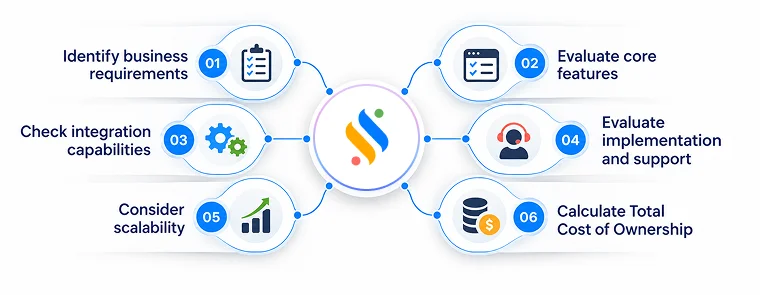
1. Identify your business requirements:
Start by mapping your existing workforce. A company where shift rostering is common will have very different needs from a company where this is uncommon. The core idea is that the system you pick should match your existing requirements.
2. Evaluate the core features:
Shortlist vendors against the features that matter for your team – biometric verification, geofencing, leave management, shift scheduling — rather than getting sold on features you’ll never use. A good attendance management software comparison should focus on what solves your specific attendance problems today.
3. Check integration capabilities:
Confirm whether attendance data runs on the same platform as your payroll and HR software, or whether it needs a separate setup. The ideal approach should be: the fewer disconnected systems, the fewer errors affect payroll processing.
4. Evaluate implementation, onboarding, and support:
Ask how long rollout typically takes, who trains your HR team and employees, and what support looks like once you’re live — not just during the sales pitch. A vendor that disappears after go-live leaves you troubleshooting alone during your first payroll cycle.
5. Consider scalability:
Choose a system built to handle the growth of your business. Software should not break if you add new locations or a few more new employees to your workforce.
6. Calculate Total Cost of Ownership:
Look past the monthly subscription fees. Maybe the plan can be under your budget, but if you constantly need manual work, it is eventually costing you more than you can imagine.
Conclusion
We hope you have understood what an attendance management system is. It is not just about recording when someone clocks in or clocks out. It is about creating a reliable system for managing the entire attendance cycle.
This especially holds true when the organization is experiencing exponential growth in headcount. This is where having the right employee attendance system becomes vital. And if you don’t want to spend hours finding discrepancies and reconciling records, we have a solution for you.
Super HRMS by Superworks brings these workflows together in one platform, helping businesses manage attendance alongside managing the entire employee lifecycle – from hiring to retiring. So, move beyond registers and spreadsheets. Book your Super HRMS demo today.