TL; DR
As the name suggests, remote employee time tracking software automatically records employees’ work hours, their website & web app usage, keystrokes and mouse movements, captures screenshots, and provides productivity data – all this and more in real-time. The tool is especially effective for businesses that have a majority of the workforce working remotely. However, with so many tools available in the market claiming to be the best, choosing the right one can be tricky. That’s why we have curated a list of the best that are out there right now. These are the tools that businesses are swearing by for monitoring the remote teams. In addition to their description, this will talk about their key features and prices. Do checkout and get the right one. Also, we have created a section that talks about what you should look for in a remote employee time tracking software.
There are two types of businesses: one that believes that managing a remote team is extremely easy.
The other who thinks that this is perhaps the biggest challenge for them.
No matter where your business falls, one thing is essential to understand here is that it is as challenging as managing employees. Simply because that working from beyond the boundaries of their cabins and cubicles, it doesn’t mean that things will be relatively smooth.
And the double whammy here would be if you manage remote teams manually through spreadsheets. That’s why you need a smart solution that eliminates the hassle and doubts that are common in managing remote teams. Not only that, it gives you real-time updates on how your employees are spending their work hours.
Remote employee time tracking software is the right solution here. But what exactly is this, which are the best ones, and how can you have the right one for your business?
This guide answers all your questions. So, let’s dive in!
What is remote employee time tracking software?
Remote employee time tracking software is a tool that logs how long your distributed team spends on work, tasks, and projects, usually through a desktop app, browser extension, or mobile timer. Most tools also offer productivity reporting, idle-time detection, project budgeting, and integrations with payroll and project management platforms.
The best remote employee time tracking software that is worth checking out!
1. Super Track
A dedicated module of the Superworks suite, Super Track is one of the most used and trusted employee monitoring software. Whether it is an SMB, a mid-sized business, or a large enterprise. Whether the team works from the office or from the hybrid and remote setup, Super Track delivers desired results. Its smart features ensure to provide a real-time update to managers on the team’s work. It is extremely user-friendly and seamlessly integrates with other Superworks modules – Super HRMS, Super Project, and Super Payroll.
Key features:
- Workforce tracking
- Employee productivity tracking
- Digital activity monitoring
- Active & idle time tracking
- Real-time performance reports
Pricing:
The following are the prices and plans of Super Track. However, it entirely depends on the number of employees:
Super Track
Professional plan: ₹399/user/month
Advanced plan: ₹499/user/month
Super HRMS + Super Track
Professional plan: ₹479/user/month
Advanced plan: ₹589/user/month
Super Project + Super Track
Professional plan: ₹849/user/month
Advanced plan: ₹949/user/month
Full suite (Super HRMS + Super Track + Super Project)
Professional plan: ₹949/user/month
Advanced plan: ₹1049/user/month
2. Insightful
Another one in this list is Insightful. One of the most talked about monitoring software, Insightful capabilities lie in tracking employees effectively, irrespective of where they work from. In addition to offering the basic monitoring features, the software is exceptional in identifying insider risk, making businesses secure.
Key features:
- Real-time monitoring
- Time and attendance
- Insider risk management
- Computer monitoring
- Work from Home
- Operational efficiency
- Productivity measurement
- User activity monitoring
Pricing:
- Workforce analytics: $8/user/month.
- Workflow optimization: $12/user/month.
- Combo plan: $16/user/month.
- Enterprise plan: Custom pricing.
3. DeskTime
DeskTime starts recording the moment a device boots up and classifies app/website time as productive, unproductive, or neutral automatically. It also bundles in shift scheduling and absence management, so smaller teams can run time tracking and basic workforce planning from one tool instead of two.
Key features:
- Time tracking
- Productivity insights
- Integrations
- Analytics & reports
- Workforce management
Pricing:
- Pro (for small teams and startups): ₹366.67 per user/month.
- Premium (for hybrid and growing teams): ₹513.33 per user/montoinh.
- Enterprise (for large organizations): Custom pricing.
4. Monitask
Monitask runs quietly in the background, taking randomized or interval screenshots as proof-of-work alongside keyboard/mouse activity tracking. It’s positioned squarely at businesses that need an audit trail for billing disputes or contractor accountability rather than deep workforce analytics.
Key features:
- Time tracking.
- Application and website detection.
- Reports.
- Timesheets.
- IP and VPN tracking.
- Screenshots.
- Employee monitoring.
- Productivity monitoring.
- Idle time tracking.
- Smartblur screenshots.
- Activity tracking.
- Stealth version.
Pricing:
Pro plan: $7.99 per user/month.
Business plan: $10.99 per user/month.
Business Premium plan: $15.99 per user/month.
Enterprise plan: Custom pricing.
This is a monthly plan.
5. WorkTime
WorkTime’s whole differentiator is that it reports a “screen productivity” percentage, how much of someone’s active screen time was productive, without ever recording or storing what was actually on the screen. For compliance-sensitive teams, that’s a meaningfully lower-risk way to get visibility than screenshot-based tools.
Key features:
- Non-invasive monitoring.
- Attendance monitoring.
- Active/idle time tracking.
- Productivity monitoring.
- Internet use monitoring.
- Computer use monitoring.
- Software use monitoring.
- Login/logout monitoring.
- Remote/work-from-home monitoring.
- Alerts.
Pricing:
- Free: $ 0
- Basic plan: $ 6.99 per user/ month.
- Premium plan: $ 8.99 per user/ month.
- Enterprise plan: $ 10.99 per user/ month.
6. wAnywhere
wAnywhere is positioned less as a time tracker with monitoring bolted on, and more as a security-first workforce platform that happens to track time along the way. It’s used by industries like BPO, BFSI, and IT. Its features, like AI facial recognition, play a key role in accurate attendance confirmation, and geofencing restricts employees from logging in from anywhere.
Key features:
- Activity tracking.
- Time tracking.
- Field force productivity.
- Attendance management.
- App & website usage.
- AUX management.
Pricing:
- Basic plan: $ 6 per user/ month.
- Standard plan: $ 8 per user/ month.
- Pro plan: $ 10 per user/ month.
- Enterprise plan: Custom pricing.
7. Workstatus
Workstatus is an India-built workforce intelligence platform. It’s a point solution for time tracking and monitoring. It covers the standard monitoring stack (activity levels, time-per-project, online timesheets) but leans more heavily into location: GPS tracking and geofencing are core to the product rather than an add-on, which makes it a more natural fit for teams with field staff or multiple job sites than for pure desk-based remote teams.
Key features:
- Activity insights.
- App & URL tracking.
- Screenshots.
- Productivity reports.
- Employee productivity
- Burnout detection.
Pricing:
- Proof plan: ₹300 per user/month
- Profit plan: ₹550 per user/ month.
Managing remote teams needs more than just a clock-in tool!
See productive hours, idle time, and work patterns in real time
What to look for in a time tracking tool for remote employees?
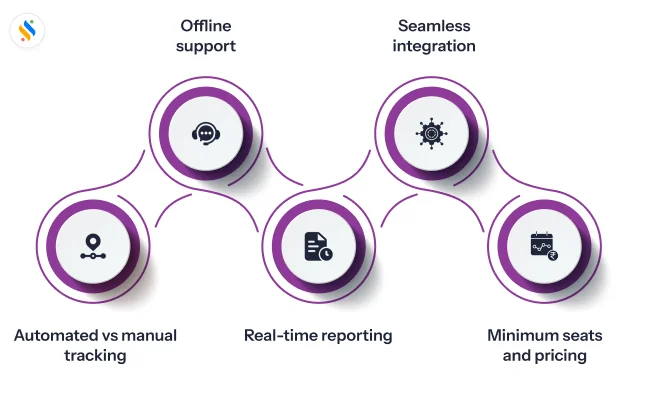
Before the list, a few non-negotiables worth checking off:
1. Automatic vs. manual tracking:
Automatic capture (no start/stop timer) gives more reliable data but feels more like monitoring; manual timers feel lighter-touch but depend on employee discipline.
2. Offline support:
A tracker that loses data the moment Wi-Fi drops is a liability for field or hybrid staff.
3. Reporting that managers will actually use:
Idle time, app/website usage, and productivity trends matter more than raw hour totals.
4. Integration with your existing HR stack:
Standalone trackers create a second source of truth; tools that plug into payroll and attendance save reconciliation work every cycle.
5. Minimum seats and pricing structure:
Several tools on this list have per-seat minimums or base fees that change the real cost for small teams.
Conclusion:
Ever since the advent of the remote working model, many businesses have used to manage them just like the way they used to manage employees who work from the office. Now, when the way of managing employees who work from the office has changed, why can’t it change for the remote workforce? That’s why there is remote employee time tracking software.
However, having it is not just about buying software; it’s a critical investment you, as a manager, need to make for smoother workforce management. And choosing the right one can be equally challenging for some businesses. That’s why we have made this blog. It covers every detail from what it is to the best ones in the market right now, and how you can have the right one.
One final tip: if you’re a founder, manager, or HR leader in an SMB or mid-sized business, don’t just look for a tool that records work hours. Look for one that helps you understand how work gets done. Super Track is one such solution. It gives you real-time visibility into employee productivity, app and website usage, active and idle time, and helps you manage remote and hybrid teams with greater confidence and clarity.
But you know the best way to evaluate software is to see it in action. So, get your free Super Track trial now.










