TL; DR
If your team works on Macs, not every employee monitoring tool will cut it. macOS has stricter permission requirements than Windows, and several popular tools either underperform or skip Mac support entirely. This blog covers the best employee monitoring software for Mac in 2026, all with confirmed macOS compatibility. If you are an HR manager, a C-level executive, or an SMB founder, and are looking for employee monitoring for Mac, this blog gives you every detail you need to make an informed decision. And if you are running a business, check out Super Track.
Imagine you have a team of 20 people, and half of them work with Macs. You ask your HR manager for a productivity report. She pulls up a spreadsheet that’s three days old, based on data no one verified, from a Windows-only tool that quietly skips all the Mac users.
That gap? It costs more than most SMB founders realize.
Macs now make up a significant share of enterprise and startup workforces. Yet most HR teams either monitor only Windows devices or end up with a cobbled-together setup that misses Mac employees entirely.
The challenge isn’t just about finding any monitoring tool. It’s about finding employee monitoring software for Mac that runs natively on macOS, handles Apple’s strict permission requirements, and delivers the same depth of insight you’d expect on any other platform.
This blog breaks down the best options available right now, with honest details on features, pricing, and where each tool falls short.
Why does monitoring Mac employees require a different approach?
This isn’t a minor technical footnote. MacOS has a fundamentally different privacy architecture compared to other operating systems, and it directly affects how monitoring software works on your employees’ machines.
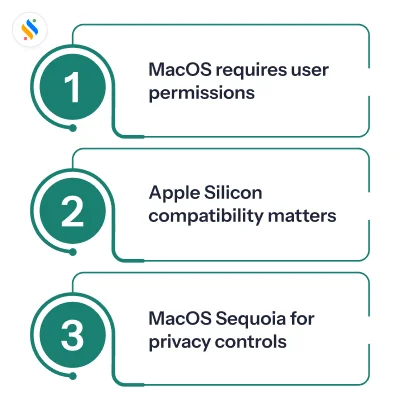
MacOS requires explicit user permissions for monitoring features:
Typically, macOS monitoring tools require specific permission settings (screen recording, etc) to work properly. These may need to be manually enabled through System Settings before using them. If these permission settings aren’t enabled, the monitoring tool could be limited in functionality or even show no data recorded.
Apple Silicon compatibility matters, and it’s about to matter more:
Chances are that most Indian businesses that have bought Macs for commercial purposes are likely using M4 or M5 chips. Yet many monitoring tools still depend on Rosetta 2. This causes higher battery usage, slower performance, and stability issues. But this is a short-term workaround. With Apple planning to phase out Rosetta 2 starting in 2027 with macOS 28, tools that fail to adopt native Apple Silicon support may stop working altogether.
MacOS Sequoia tightened privacy controls further:
The latest macOS release has added periodic reauthorization for screen recording access for applications; therefore, permission that was previously granted at installation will need to be resubmitted on an ongoing basis. This makes it even more important to ensure that your monitoring solution has a clear installation process that is compliant with regulations.
None of this makes employee monitoring for Mac impossible. It just means your tool selection needs to be more deliberate.
What to look for in Mac employee monitoring software?
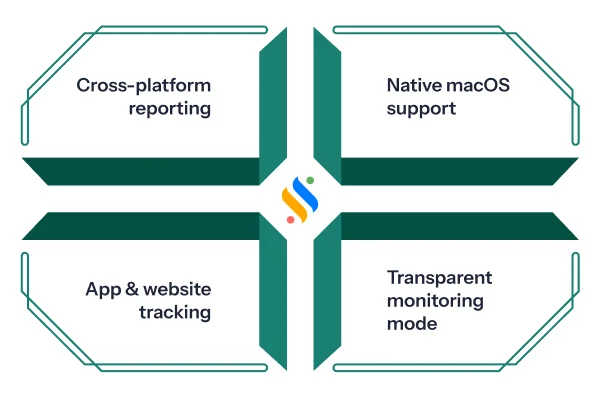
Before comparing tools, get clear on what “monitoring” actually means for your team. These six criteria should guide your decision:
1. Native macOS agent, not just a web dashboard:
The tool must install a lightweight desktop agent on the employee’s Mac. This is what captures screenshots, app usage, idle time, and keystroke/mouse activity, and each of these draws on a different macOS permission. Screenshots need screen recording access, and keystroke and mouse tracking need input monitoring, a permission Apple separated from Accessibility starting with macOS Catalina. A dashboard you access from a Mac browser doesn’t request any of these, which is exactly why it isn’t the same as a Mac monitoring agent.
2. Transparent monitoring mode:
Stealth monitoring is a grey area from both an employee trust and a legal standpoint. The best Mac employee monitoring software options offer a “visible” mode that employees are aware of, alongside detailed activity logs for managers. Transparency reduces legal risk and improves adoption.
3. App and website tracking with productivity categorization:
Raw data is ineffective if you try to decode it. That’s why look for tools that categorize apps and URLs as productive, unproductive, or neutral, and let you customize those categories as per your requirements.
4. Cross-platform reporting:
If your team uses a mix of Mac and Windows devices, you need unified reporting. Separate dashboards for different OS types create management blind spots.
Best employee monitoring software for Mac in 2026!
Let’s check out the list of the best employee monitoring software in India.
Super Track, a product of Superworks’ dedicated ecosystem, is an employee monitoring software. What sets it apart from most tools on this list is that it doesn’t operate in isolation; it feeds monitoring data directly into attendance, payroll, and performance workflows, eliminating the need to stitch data together manually.
Super Track is available for all the major operating systems, including macOS. For HR managers overseeing mixed-device teams, this alone is a significant advantage.
Key features:
- Live activity overview
- App and website usage tracking
- Screenshot capturing
- Employee timeline
- Keyboard and mouse activity tracking
- Productivity reports and performance ledger
- Team engagement insights
- Integration with Super HRMS, Super Payroll, and Super Project
Pricing:
The following are the prices and plans of Super Track. However, it entirely depends on the number of employees:
Super Track
Professional plan: ₹399/user/month
Advanced plan: ₹499/user/month
Super HRMS + Super Track
Professional plan: ₹479/user/month
Advanced plan: ₹589/user/month
Super Project + Super Track
Professional plan: ₹849/user/month
Advanced plan: ₹949/user/month
Full suite (Super HRMS + Super Track + Super Project)
Professional plan: ₹949/user/month
Advanced plan: ₹1049/user/month
Hubstaff is one of the most well-established names in the time tracking and employee monitoring for Mac category. Its macOS agent is mature, permissions-compliant, and tested across a wide range of macOS versions.
Beyond basic activity tracking, Hubstaff shines when you need to manage distributed teams across time zones. The GPS geofencing feature, which automatically clocks employees in and out based on job site location, is something few Mac monitoring tools offer in the same depth.
Key features:
- Employee monitoring
- Time tracking with screenshots
- App and URL usage
- Employee activity tracking
- Idle time tracking
- Workforce analytics
Pricing:
Starter plan: $7/user/month.
Grow plan: $9/user/month.
Team plan: $12/user/month.
Enterprise plan: $25/user/month.
Time Doctor is a workforce analytics platform that runs on macOS and is particularly popular among agencies, BPOs, and companies with distributed teams. Its idle time pop-up feature is one of the more practical implementations in this space. When no keyboard or mouse activity is detected for a set period, it prompts employees to pause the timer, preventing time fraud without requiring manager intervention.
The reporting depth is genuinely strong. Time Doctor breaks down time by project, task, and individual useful for client billing and for identifying exactly where time is being lost.
Key features:
- Benchmark AI
- TIme tracking
- Payroll
- Screen monitoring
- Unusual activity report
- Employee monitoring
- Attendance
- Time management
Pricing:
Basic plan: $6.67/user/month.
Standard plan: $11.67/user/month.
Premium plan: $16.70/user/month.
Enterprise plan: Custom pricing.
Teramind is the heaviest tool on this list in terms of both features and price. Its UEBA (User and Entity Behaviour Analytics) builds behavioural baselines for each employee and triggers real-time alerts when anomalies are detected. This goes well beyond productivity monitoring into genuine insider threat management.
Key features:
- Insider risk management
- Data loss prevention
- AI governance
- Employee productivity
- Hybrid workforce management
- Business process optimization
- Behaviour data telemetry
Pricing:
Starter plan: ₹1314 per user/month.
UAM: ₹2628 per user/month.
DLP: ₹3066 per user/month.
Enterprise and government: Custom pricing.
ActivTrak positions itself as a workforce intelligence platform rather than a surveillance tool, and the distinction shows up in how the product is built. The dashboard is oriented around productivity trends, burnout risk signals, and coaching opportunities rather than raw activity logs. It runs on macOS and offers a free plan that supports up to 3 users, making it a low-friction starting point for smaller teams.
Key features:
- Workforce management
- Productivity & performance
- AI insights
- Tech usage & compliance
- Productivity optimization
Pricing:
Free plan: $0/user/month.
Essentials plan: $10/user/month.
Essentials plus plan: $15/user/month.
Professional plan: $19/user/month.
DeskTime is one of the simpler Mac employee monitoring software options on this list. It starts tracking the moment the employee logs in and stops when they close the app, no manual input required. This simplicity is both its strength and its limitation.
For teams where HR overhead is low and the main goal is reliable time data, DeskTime covers the essentials well. It categorizes apps and websites, calculates daily productivity, and generates reports based on tracked time.
Key features:
- Time tracking
- Productivity insights
- Integrations & API
- Analytics & reports
- Workforce management
Pricing:
Pro (for small teams and startups): ₹366.67 per user/month.
Premium (for hybrid and growing teams): ₹513.33 per user/month.
Enterprise (for large organizations): Custom pricing.
Do you think you know your team’s productivity? Think again!
Visibility gaps across Mac and Windows devices cost your business
How to choose the right employee monitoring software for Mac?
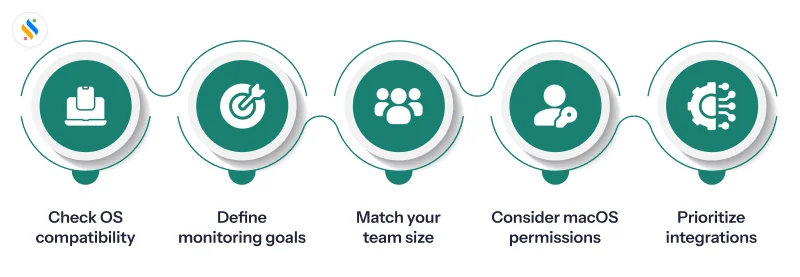
Start with your OS reality:
A cross-platform agent is an absolute requirement if you are using Windows, Mac, or Linux. If you monitor only PC activities, there will be large reporting gaps that will eventually be realized. Therefore, ensure that the agent is fully functional on every type of operating system/device.
Define what “monitoring” means for your business:
There’s a difference between time tracking, productivity monitoring, and surveillance. Time tracking records when people work. Productivity monitoring shows what they’re working on, apps, websites, and active vs idle time. Security monitoring also includes monitoring the movement of data, the transfer of files & the detection of behavioural anomalies. Make sure that you purchase the right security monitoring tool for your company’s needs.
Match the tool to your team structure:
A small startup where most of the workforce works remotely will have different requirements compared to a company with a workforce of 200. Notice the difference? The requirements of smaller businesses are generally lightweight, easy setup, and transparent. On the other hand, larger enterprises might require access controls, individual and department-wise productivity reporting, and integration with the existing systems. Therefore, it is essential to be thoroughly aware of your own requirements, because what works for a team of 20 will not work for one with 200.
Factor in macOS permission complexity:
This is specific to Mac, and most buyers overlook it. Every monitoring feature, screen recording, accessibility tracking, and full disk access requires manual permission grants on macOS. Some tools handle this cleanly through MDM deployment. Others require employees to navigate System Settings themselves, which creates inconsistent adoption and gaps in data. If you’re rolling out across 50 or more Mac devices, ask vendors specifically how they handle macOS permission management at scale.
Evaluate integration before price:
A standalone monitoring tool gives you data. When selecting the tool, it is necessary to consider how well it can integrate with your existing systems. To help evaluate the tool’s compatibility with your needs, you should build a matrix that measures aspects like attendance, leave, evaluation, and payroll functions of each component and whether or not that component integrates with the monitoring software or requires exporting data manually. The cost of fragmented data across separate tools usually exceeds the cost of paying slightly more for one integrated solution.
Conclusion
Not every employee monitoring tool earns its place on a Mac. macOS has stricter permission requirements, Apple Silicon compatibility isn’t guaranteed across older tools, and a standalone monitoring setup that doesn’t connect to your HR and payroll workflows will give you data without direction.
The tools that we talked about here cover all the macOS compatibility bar, but the right choice comes down to how well the tool fits your team’s size, structure, and the systems you already run on. Get that match right, pair it with a transparent monitoring policy, and the visibility you gain will actually move the needle.
If you want monitoring that connects directly to attendance, payroll, and performance workflows, not just a standalone dashboard, Super Track is worth a closer look. No credit card required. No lengthy sales calls. Just a live demo built around your team.










