TL; DR
How to choose HRMS software without a plan is like driving at night with the lights off. That’s why, before you sign any contract, audit your current HR operations, map out must-have features, set a realistic budget, shortlist vendors using a weighted evaluation metric, send out an RFP, run a pilot with real data, and watch out for red flags like vague SLAs, hidden costs, and multi-year lock-ins. This 7-step framework helps Indian businesses – from MSMEs to enterprises make a confident, informed HRMS buying decision in 2026.
There has been an exponential rise in Indian businesses investing in HRMS software – a full Human Resource Management System that unifies the entire human resources function. The right HR software can transform the way an entire HR department runs, but the problem is that as this number is growing, there are also cases where everything comes crashing down. In the worst cases, the software doesn’t function for more than a year.
Now, put yourself in the shoes of an HR professional who is looking to make day-to-day HR operations seamless, or a startup founder who wants to make attendance, leave, and shift scheduling efficient – and all of a sudden, the system breaks? Sure, there might be several reasons for that, but the problem usually starts with choosing the wrong HR software vendor.
This HRMS buying guide gives you a 7-step buyer’s framework that you need in 2026 to get the best HR software for your business needs. So without further ado, let’s start right away!
Step1 Start by knowing the stage at which HR operations are currently
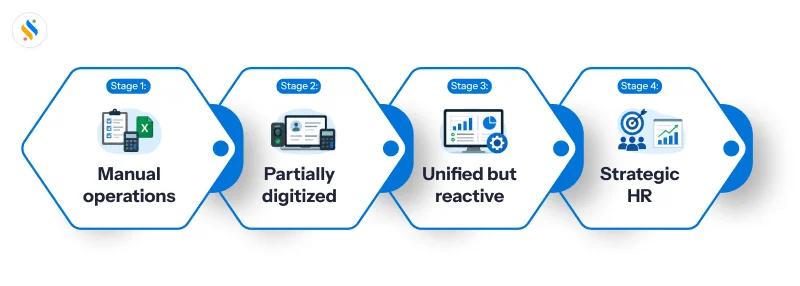
Before coming to the decision of buying an HRMS software, and even before Googling it, it is important to answer one question: where are your HR operations right now? Most businesses buy HRMS software without evaluating the current scenario of their HR operations. The clearer you are about how your HR department works today, the easier it becomes to shortlist HR software that actually fits. Here is how you can do it:
Here is how you can do it:
Stage 1: Manual operations
Everything runs on spreadsheets. Attendance is tracked manually, payroll is calculated in Excel, and leave approvals happen over email or on WhatsApp.
Stage 2: Partially digitized
Chances are that you might have some tools in place. It could be a biometric device for attendance, a separate payroll software, and a basic hrms vs hris for employee records. But the problem is that they aren’t integrated. Your HR team is still manually reconciling data across systems every month.
Stage 3: The system is unified by reactive
You have a working HRMS, but you are using it primarily for operational tasks, payroll processing, approving leaves, and generating reports. The HR software handles core admin, but you’re not yet using its reporting capabilities to drive decisions; it’s just reducing manual work.
Stage 4: Strategic HR
HR is a business function, not just an admin function. Modern HR teams track attrition, run structured performance management cycles, use workforce planning data to drive hiring and planning decisions, and align HR metrics directly with business goals. At this stage, HR technology is no longer a cost — it’s a strategic asset.
Step 2: Map out your features
Once your first step is clear, the next step is to define your HR software requirements. And the best way to do it is by creating your HR software feature checklist. This list will be non-negotiable, as it will contain the features that are essential for your business requirements. Divide your requirements into three tiers:
Tier 1: Must-have features
Without these features, you can’t imagine running your business effectively. Core HRMS checklist for Indian businesses:
- Centralized employee database management with complete employee lifecycle tracking.
- Attendance management with biometric, mobile, and geo-fencing support.
- Leave management with configurable leave types and approval workflows.
- Payroll processing with automated PF, ESIC, TDS, and Professional Tax calculations.
- Form 16, Form 24Q, and statutory filing support.
- Employee self-service portal with mobile access via a dedicated app.
- Documentation management.
- Compliance, data security, and adherence to regulatory rules.
Tier 2: Should-have features
These are features you will require when your business starts to scale. The features include,
- Recruitment and applicant tracking (ATS) with built-in recruitment tools.
- Employee onboarding and offboarding automation.
- Performance management with goal setting and appraisal cycles.
- Shift scheduling and rostering.
- Expense and reimbursement management.
- HR analytics and custom reporting.
- Multi-location and multi-branch workforce management.
Tier 3: Nice-to-have features
These are features that are effective in nature, but are not required immediately.
- AI-driven workforce analytics and attrition prediction.
- Learning management system.
- Succession planning and career pathing.
- OKR-based performance management.
- Multi-country payroll processing.
- Multiple tools integration.
Step 3: Set your budget
The single biggest mistake that managers, C-level executives, and MSME founders sometimes make is being unable to set the right budget. Set your budget once you clear the first two steps. Here is what the Indian HRMS market looks like in 2026:
SMB (under 50 employees):
- Market range: ₹30–₹50 per employee per month
- Market average: ~₹65 per employee per month
Mid-market (50–500 employees):
- Market range: ₹50–₹150 per employee per month.
- Market average: ~₹150 per employee per month.
Enterprise (500+ employees):
- Custom pricing available.
Step 4: Shortlist vendors with an evaluation metric
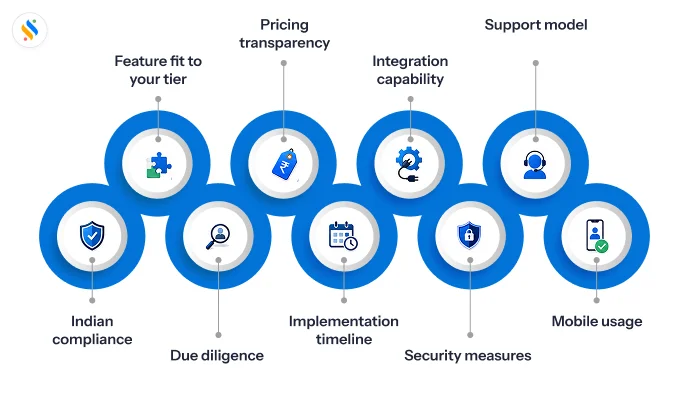
Once you’re all set with everything, including your budget, start the process of shortlisting the vendors of how to choose HRMS software. The goal here is to filter out vendors that cannot meet your minimum requirements. This way, you’d be able to save your time. Here is a vendor evaluation metric that can be at your disposal.
| Criteria | Weight |
|---|
| Indian compliance depth | 25% |
| Feature fit to your tier | 15-20% |
| Due diligence | 15% |
| Pricing transparency | 10% |
| Implementation timeline | 15% |
| Integration capability | 15% |
| Security measures | 10% |
| Support model | 5% |
| Mobile usability | Merged into feature fit |
Step 5: Run an RFP/RFI
A formal RFP (Request for Proposal) or RFI (Request for Information) should be non-negotiable. It is the document that protects you during negotiation and gives you a structured basis to compare vendors objectively. An RFP forces vendors to respond to your requirements on your terms. It also reveals which vendors are transparent about their limitations and which ones are only trying to sell you their product. So, what should you include in it?
Company overview and context:
- Your company size, industry, and current tools that you are using.
- The problems you want to resolve and determine your go-live timeline.
- Number of employees, locations, and payroll complexity.
Functional requirements:
- Your complete Tier 1 and Tier 2 feature checklist.
- India compliance requirements.
- Integration requirements with existing systems.
Technical requirements:
- Deployment preference – cloud, on-premise, or hybrid.
- Data residency requirements.
- Security certifications and data security standards.
- Uptime SLA requirements.
- API availability and documentation.
Vendor details:
- Number of Indian customers of similar size.
- Average implementation timeline for your profile.
- Support model.
Pricing details:
- Base subscription cost per employee per month
- All add-on and module costs
- Implementation and onboarding fees
- Data migration fees
- Annual renewal terms and rate escalation clauses
- Contract length options
Confused about choosing the HRMS software for your business?
Check out our buyer’s framework and get the best HRMS software!
Step 6: Pilot with real data
There is a reason why so many vendors in the market give you the opportunity to book a demo of their product. The smart thing to do is not to let this slip through. That’s because it shows you what the software can do in ideal conditions. A pilot shows you what it does with your data, your workflows, and your team. The best advice? Never finalize a vendor without running a pilot.
Pilot framework for Indian HRMS buyers:
Data to use:
- Real employee records
- One complete payroll cycle with PF, ESIC, TDS, and PT calculations
- Real attendance data from your current system
- At least 2–3 leave workflows with approvals
- One onboarding workflow for a new hire
What to look for in the pilot test?
- Payroll accuracy: Run one full payroll cycle and make a comparison of the result with your existing system. Ensure that the data is accurate.
- Statutory filings: Verify that PT, EPF, ESIC, TDS, and challans – all the essential compliance documents are generated correctly and in the right format.
- Attendance management: Import one month of attendance data and look at how the system handles attendance tracking, clock-in, breaks, clock-out, overtime, and so on.
- Leave management: Ensure that leave submission, along with approval/rejection, is swift. Do verify that balances update correctly.
- Employee self-service: Let employees use the employee self-service and collect feedback.
- Report generation: Generate multiple reports and verify accuracy and format.
Step 7: The red flags you should watch out for!
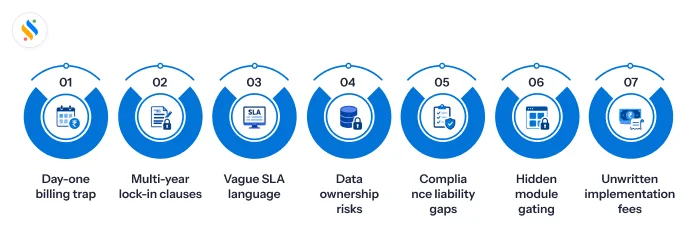
Day-one-of-purchase billing:
Some enterprise vendors – particularly larger platforms – start billing from the day the contract is signed, not from the day you go live. If implementation takes months, it can easily be considered to be a waste of money.
Multi-year lock-in with no exit clause:
An x-year contract with no early exit clause means you are committed even if the product fails to deliver. This is particularly risky if the vendor has not built features yet.
Vague SLA language:
“Best effort” uptime and “reasonable response times” are not SLAs. They are legal escape hatches.
Data ownership and portability:
If you leave the platform, who owns your data? How long does the vendor retain it? In what format can you export it?
Compliance liability:
If the system miscalculates PF or TDS and you receive a penalty from EPF or the Income Tax Department, it will be you who has to bear the brunt of legal issues.
Hidden module gating:
Some vendors advertise an all-in-one platform but gate key features behind higher-tier plans or add-on charges that are not disclosed during the sales process.
Implementation fees not in writing:
Whenever a vendor commits to free implementation, free data migration, or dedicated onboarding support verbally, it clearly means nothing. That’s because it’s not in the contract. And the vendor can turn back on his commitment, too.
Before you go through all these steps, it helps to first understand what is hrms software—a unified digital platform that automates all core HR functions like payroll, attendance, leave management, and employee data, helping businesses run HR operations more efficiently.
Wrapping up,
There is no direct answer to how to select HR software. But one thing is certain – choosing HR software for your business is just like choosing a life partner. One wrong decision and the whole thing will crash down. Now, when there are so many HRMS software vendors claiming that they are the best in the market, choosing the right vendor and the right software can be tricky.
This is especially true if you are an HR professional, a manager, or a founder of an MSME in India. But don’t sweat, because the buyer framework that we talked about here will surely help you in getting the right HR software for your business needs. If you want to compare the leading platforms available today, this detailed guide on HRMS Software in India highlights top vendors and features to help you decide with confidence. And if you’re looking for a smart HRMS tool without breaking your bank, Super HRMS by Superworks is the software you should implement in your business. Whether your workforce is 10 or 100, Super HRMS scales efficiently and gives you the features you need to make your HR operations extremely smooth. So stop procrastinating and get Super HRMS for your business. Book a demo now!










