
TL; DR
“ Manual vs. automated payroll – which process is right for my business?” HR managers, C-level executives, and business founders in India often come across the choice of choosing the most efficient method for their payroll. But there is not a single fixed answer. While an automated payroll process is the top choice of many Indian businesses today, there are businesses that still prefer a manual process. Now, both processes have pros and cons, and they need to be studied thoroughly. This blog explains both of them in detail.
Payroll processing is an essential operation that businesses run every month. The responsibility falls on the HR and finance team to ensure that every employee receives accurate payslips and gets paid fairly and on time. However, this is only possible if the employees’ attendance, leave, shifts, and OTs are logged accurately. At the same time, statutory deductions should be correct.
Now, add everything up, and you will realise that it is a complete process where there is no room for errors.
For many businesses, spreadsheets and manual calculations are still the reliable process to get the job done. The reason? They seem simple enough, especially when the workforce is small.
But as the business grows, so does the work behind the payroll cycle. More employees mean maintaining their records, their bank details, and their salary structures. Not to mention the changing pay structures, and on top of that, the ever-evolving changes in compliance rules and regulations. Now, doing all these manually leaves room for errors.
This raises an important question: Is a manual payroll system right for you, or should you switch to an automated payroll system? Through this blog, we will take a look at what manual and automated payroll are, the distinction between the two, and what each means for your business.
What is a manual payroll system?
Understanding manual vs. automated payroll starts by understanding both of them correctly. Let’s start with a manual payroll system.
1. Advantages of a manual payroll system
Unlike payroll for a payroll software subscription, businesses can manage payroll using tools like Excel. This makes it a low-cost option for small teams with simple salary structures.
Complete control over the process:
HR and finance teams can manage every step of payroll easily. They can review entries, make changes, and handle the process as per their requirements.
High flexibility for custom pay structures:
Spreadsheets allow teams to create formulas for different salary components. They can adjust these calculations whenever business requirements change.
No technical learning curve:
Most teams already know how to use spreadsheets. They can manage payroll with familiar tools.
Reduced exposure to cyber threats:
Keeping payroll records offline can reduce exposure to certain online threats.
Easy to audit for very small teams:
When a business is small, reviewing payroll records is easier. HR teams can check salary calculations against attendance records, verify deductions, and identify errors.
2. Disadvantages of a manual payroll system
High risk of human error:
Manual payroll involves repeated data entry and calculations, increasing the chance of mistakes, which can also lead to inaccurate payments.
Time-consuming and inefficient:
HR teams must collect employee data, check attendance, calculate salaries, and prepare payslips manually every month. As the workforce grows, these tasks take longer and leave less time for other HR responsibilities.
Compliance and penalty risks:
Payroll teams must keep track of statutory requirements. When these rules and filing deadlines are managed manually, it becomes easier to miss an update or make an incorrect calculation.
Poor leave and attendance tracking:
When attendance, overtime, and leave records are maintained separately, bringing all the information together for payroll can be difficult. Missing or incorrect entries may affect salary calculations.
Security and data loss threats:
Payroll records contain sensitive information. Storing these details in spreadsheets or physical files can make them vulnerable to unauthorised access or data loss.
Limited reporting and scalability:
Manual payroll makes it difficult to generate detailed reports on salary expenses, deductions, and payroll trends. As employee numbers and salary structures become more complex, maintaining records and preparing reports requires more time and effort.
What is an automated payroll system?
An automated payroll system is software that calculates, processes, and distributes employee pay using predefined rules and connected workflows. It pulls data directly from time-tracking or HR software to handle wages, deductions, and taxes.
1. Advantages of an automated payroll system
An automated payroll system applies the same salary structures, deductions and tax rules every time. Attendance, leave, and overtime flow in directly, so there is no re-entry and far less to double-check.
Payroll often takes days of collecting inputs, calculating and generating payslips. Automation does most of this in the background. Your HR team can finish a pay cycle in hours.
Statutory compliance and audit readiness:
Indian payroll and compliance rules change often. An automated system keeps these rules current and applies them correctly in every cycle. It also stores payroll records in one place, so challans, returns and past payslips are available easily.
Timely pay and employee self-service:
Employees expect to be paid correctly and on time, every month. Automation helps you keep that promise. Through a self-service portal, they can download payslips, view tax declarations and check their leave and salary details without raising a request with HR.
Salary data is sensitive, and shared spreadsheets and email attachments are easy to leak. An automated system keeps this data in one secure place with role-based access, so people see only what they need. Encryption and activity logs add protection and show who changed what.
With manual payroll, every new hire, new location or new pay structure adds more work. An automated system absorbs this growth without extra effort. You can add employees, set up multiple pay groups or switch to variable pay without rebuilding your process.
2. Disadvantages of an automated payroll system
Cybersecurity and data privacy risks:
Payroll systems store sensitive employee information. If the software has weak security controls or faces a cyberattack, this information could be exposed or misused.
System downtime and glitches:
Payroll software depends on internet connectivity and a reliable system. Technical glitches, server outages, or failed integrations can interrupt payroll processing and delay salary payments.
Learning curve and less personal support:
Employees and payroll teams may need time to understand the software, learn its features, and adjust to new workflows. Some employees may also prefer speaking directly with HR about salary discrepancies or payment concerns. Without accessible human support, resolving these queries can become frustrating.
Manual vs automated payroll at a glance
Here’s the comparison of a manual payroll system vs. an automated payroll system.
| Manual payroll | Automated payroll |
|---|
| Monthly effort (50 employees) | About 32 hours | A few hours |
| Where errors come from | Broken formulas, copy-paste, rule changes nobody applied | Setup mistakes, usually caught in a parallel run |
| Rule changes (PF ceiling, wage definition, tax forms) | Someone has to read each one and edit every sheet | Updated once in settings and applied to every employee |
| Audit trail | A folder of file versions | A log of who changed what, and when |
| Control | The person who prepares payroll often pays it too | Separate permissions for preparing, approving and paying |
| Employee self-service | Payslips and tax proofs by email to HR | Self-service payslips, declarations and Form 16 / Form 130 |
| Data security | Salary sheets on laptops, email and WhatsApp | Role-based access and password-protected payslips |
| Key-person risk | High: one person understands the sheet | Low: the process lives in the system |
| Upfront effort | None | Setup plus one parallel month |
Cost example of manual payroll and automated payroll system
Priya runs HR and payroll for a 50-person company in Jaipur. She earns ₹35,000 a month, about 176 working hours (22 days × 8 hours), so her time costs roughly ₹200 an hour. Here’s a typical month before and after software.
| Manual (in hours) | Automated (in hours) |
|---|
| Consolidating attendance and leave | 8 | 1 |
| Salary calculation, revisions, joiners and leavers | 6 | 1 |
| PF, ESI, PT and TDS workings | 5 | 1 |
| Bonus, overtime, arrears, advances, loans | 3 | 0.5 |
| Payslips | 3 | 0.5 |
| Bank file and challan amounts | 2 | 1 |
| Employee queries and corrections | 5 | 1.5 |
| Review and approval | 0 (nobody checks) | 1.5 |
| Total | 32 hours | 8 hours |
Now the rupees:
| HR time | 32 × ₹200 = ₹6,400 | 8 × ₹200 = ₹1,600 |
|---|
| Consultant for statutory workings or filing | ₹3,000 | ₹1,500 (filing only) |
| Errors, rework and late-payment interest | ₹1,500 | ₹300 |
| Software at ₹80 per employee | ₹0 | ₹4,000 |
| Total | ₹10,900 | ₹7,400 |
See what your payroll cycle could look like with a smart solution
Choose a smart solution that allows you to manage attendance, payroll, and compliance from one place.
Why has running payroll manually become riskier in 2026?
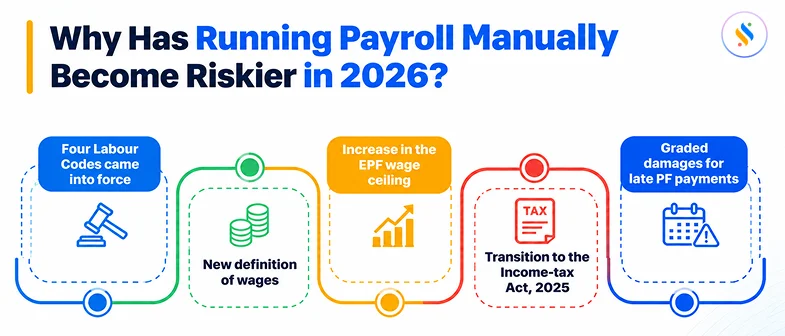
The four Labour Codes came into force:
On 21 November 2025, four Labour Codes came into force, replacing 29 older labour laws. Payroll teams now work with a new set of definitions and rules for wages and social security.
Wages have a new definition:
Under the Codes, if excluded allowances make up more than 50% of an employee’s total pay, the excess is added back to wages for PF, ESI and gratuity. Every salary structure with a low basic pay needs to be rechecked. In a spreadsheet, that means reviewing every employee by hand.
The EPF wage ceiling went up:
From 17 September 2026, the EPF wage ceiling rose from ₹15,000 to ₹25,000, the first change since 2014. September 2026 required pro-rata calculation across two wage ceilings within a single Electronic Challan-cum-Return (ECR) due by 15 October 2026.
Income tax moved to a new Act:
The Income-tax Act, 2025 replaced the 1961 Act on 1 April 2026. Salary TDS now falls under Section 392, Form 24Q has become Form 138, and Form 16 becomes Form 130 from tax year 2026-27. Payroll templates, trackers and employee communication all need updating.
Late PF payments now attract graded damages:
Under the Code on Social Security and the EPF Scheme, 2026, a late PF deposit carries simple interest of 12% a year, plus damages of 0.25% to 1% of the arrears for each month of delay. One short delay costs little. A mistake that runs unnoticed for months, such as PF still capped at the old ceiling, is different. When it surfaces in an inspection, arrears, interest and damages are worked out for every month it ran.
With an automated payroll system, each update is made once in the settings and applied to every employee in the next run. With manual payroll, it depends on one person catching the change in time.
Signs it’s time to move from manual to automated payroll system
Move to software when any of these appear:
| |
|---|
| You reach 10 employees | ESI provisions apply to establishments with 10 or more employees under the Code on Social Security. |
| You reach 20 employees | PF applies to every establishment with 20 or more employees, in any industry. |
| A second state or location | Different PT slabs and LWF rules, often different pay dates. |
| Attendance comes from a device or app | Consolidation becomes the slowest step of the month. |
| Variable pay, overtime or staff loans | The most error-prone items in any spreadsheet. |
| More than two corrections a month | You’re already paying for software, just in rework. |
How Superworks handles the move from manual payroll
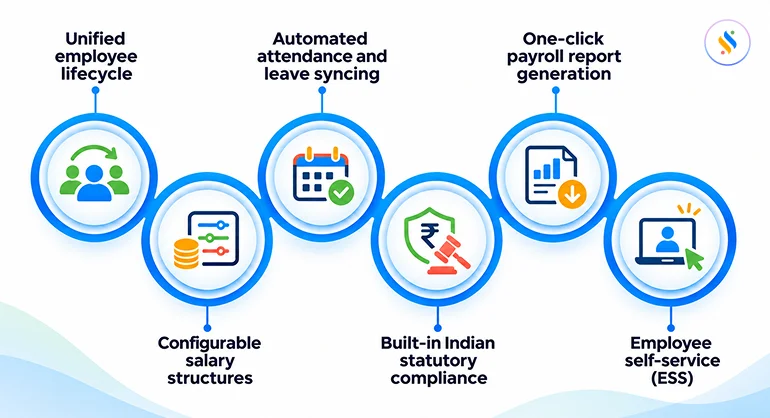
Superworks’ Super Payroll is built to take you from a spreadsheet to a more controlled process.
Unified employee lifecycle:
Employee information often gets scattered across different files and departments. Superworks brings employee records, onboarding, attendance, leave, payroll, and exit management together on one platform. This gives HR teams a single place to manage employee information throughout their time with the company.
Configurable salary structures:
Every employee may have a different salary structure, with varying allowances, deductions, bonuses, and other components. Super Payroll lets businesses create flexible salary structures based on their policies, making monthly salary calculations easier to manage as the team grows.
Automating attendance and leave syncing:
Manually checking attendance, approved leaves, overtime, and absences before processing salaries takes time. Super Payroll is integrated with Super HRMS to automatically sync these records, reducing repeated data entry and helping HR teams calculate payable salaries more accurately.
Built-in Indian statutory compliance:
Calculating PF, ESI, Professional Tax (PT), and TDS manually can become difficult, especially when employee records and applicable rules change. Super Payroll automates these statutory calculations and generates compliance reports, helping businesses manage their payroll obligations with fewer manual steps.
Preparing salary statements, deduction summaries, and statutory reports manually can delay payroll reviews. Super Payroll lets HR and finance teams generate payroll reports directly from the dashboard, making it easier to review salary details, verify deductions, and maintain records.
Employee self-service (ESS):
HR teams often spend time responding to routine requests for payslips, salary details, and tax documents. With an employee self-service portal, employees can access their payslips, check leave balances, manage attendance, and download tax documents independently. This reduces routine queries and gives HR more time for other responsibilities.
Want to make it all happen? Book a demo today!
The next step
The discourse around manual vs. automated payroll systems boils down to your decision and your existing numbers. Time your next payroll month honestly: hours spent, consultant fees, corrections made. Put them into the ROI calculator on the payroll software, then check the switch signals above.


