What Is Payroll Software? Meaning, Features & How It Works
TL; DR
One of the questions that HR managers, C-level executives, and SMB founders who want to move from manual ways of managing payroll and compliance to a much more advanced solution often ask is, What is payroll software? Many people think that it is some complex solution that is only for large enterprises. But that is not the case. It’s software that automates, streamlines, and simplifies the entire payroll processing and compliance management. Salary calculation, bonus & advances, payslips generation, loan management, statutory compliance – and in the Indian context, that is PF, ESIC, TDS, and PT- and accurate payroll reports & analytics generation in real-time – all that gets done without any manual intervention. This blog explains all this and more in great detail.
Every payday, someone in your company checks attendance, recalculates PF and TDS, and hopes last month’s spreadsheet formula still holds. It usually does, until a tax slab changes or a new employee joins mid-month and the whole sheet needs re-checking by hand. That single point of failure is exactly why payroll software exists.
If you’ve landed here searching for what payroll software is, chances are you’re at that exact decision point, either replacing a spreadsheet or a payroll vendor that’s outgrown your business. This blog covers the meaning in plain terms, how the software actually works behind the scenes, what changes for a small business specifically, and how to evaluate one properly before you commit to it.
What is payroll software? (in plain words)
Payroll software is a digital system that automates the entire payroll process.
Before this software existed, HR teams ran payroll on spreadsheets. Every month, someone manually added up attendance, calculated PF and ESI, checked TDS slabs, and typed out payslips by hand. One wrong formula, and an employee’s salary was off by a few thousand rupees.
At its core, the meaning of payroll software is having a solution that removes manual ways of doing payroll processing. The system takes attendance and leave data as input, applies your salary structure and India’s statutory rules, and produces accurate payslips and bank transfer files as output.
How does payroll software actually work?
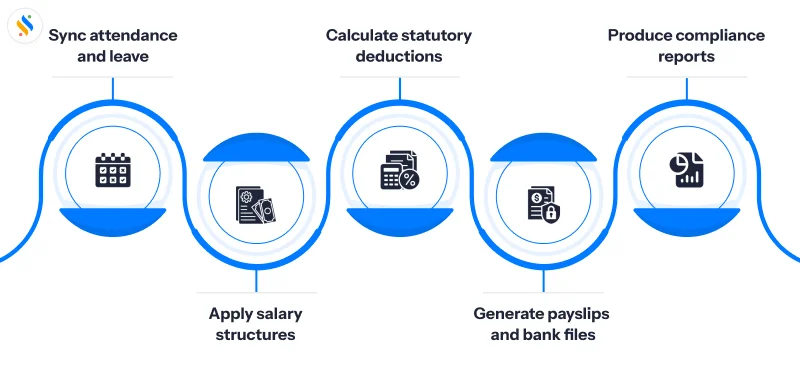
These steps tell you how payroll software works:
Step 1: It pulls in attendance and leave data:
The software syncs with your attendance system – biometric, GPS, or a simple leave tracker – so working days, overtime, and loss of pay are calculated automatically instead of being typed in by hand. The result? Accurate and timely payments. This integration reduces manual payroll processes and helps improve payroll accuracy.
Step 2: It applies your salary structure:
Basic pay, HRA, special allowances, and any variable pay components are calculated based on the salary structure you’ve configured for each employee or role.
Step 3: It runs statutory deductions:
PF, ESI, professional tax, and TDS are computed using the current rates and slabs. This is the step where manual payroll goes wrong most often, because these rates change and spreadsheets don’t update themselves. Automated tax calculation helps payroll teams apply the right tax deductions and payroll taxes according to applicable tax rules and regulations.
Step 4: It generates payslips and bank files:
Once everything is validated, the system creates digital payslips and a file your bank can use to credit salaries directly. This helps businesses automate payments and support timely salary disbursement, including direct deposit where applicable.
Step 5: It produces compliance reports:
PF challans, ESI returns, and TDS reports are generated in the format needed for filing, so payroll and compliance don’t become two separate jobs.
Don’t make payroll processing a monthly fire drill!
Let payroll software take care of your salary calculations, tax filings, deductions, and compliance.

Core features to look for in payroll software
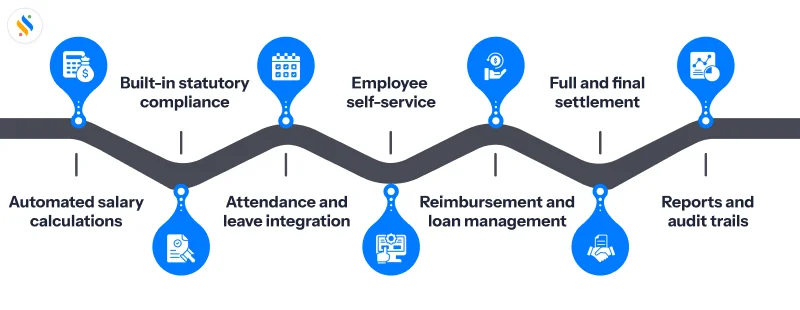
Not every payroll tool does all of this well. Here’s what separates genuinely useful payroll software from a glorified calculator.
Automated salary calculation:
Gross pay, deductions, and net pay should be calculated automatically from your salary structure — no manual formulas, no re-entry each cycle. Accurate calculations reduce human error and help ensure employees are paid accurately during every pay cycle.
Statutory compliance built in:
PF, ESI, TDS, and professional tax rules should be pre-configured and updated automatically when government rates change.
Attendance and leave integration:
Payroll should pull attendance and leave data directly, instead of someone exporting a spreadsheet and re-typing numbers.
Employee self-service:
Employees should be able to log in, download payslips, check Form 16, and submit investment declarations without emailing HR every time.
Reimbursement and loan handling:
Approved reimbursements, salary advances, and loan EMIs should flow into payroll automatically, not get tracked separately.
Full and final settlement:
When someone exits, the system should calculate pending salary, leave encashment, and deductions without a manual reconciliation exercise. This makes it easier to manage payroll during employee transitions while keeping employee records and payroll data up to date.
Reports and audit trail:
You should be able to pull a payroll register, a cost breakdown, or a full audit trail in a few clicks when finance or an auditor asks for it. Clear payroll reports improve visibility into payroll management and support better operational efficiency.
What is a payroll software for small businesses?
This question has a lot to do with the scale and the requirements. For large enterprises, managing multiple entities, pay structures, and looking after state-wise compliance is a challenge that perhaps small businesses don’t face.
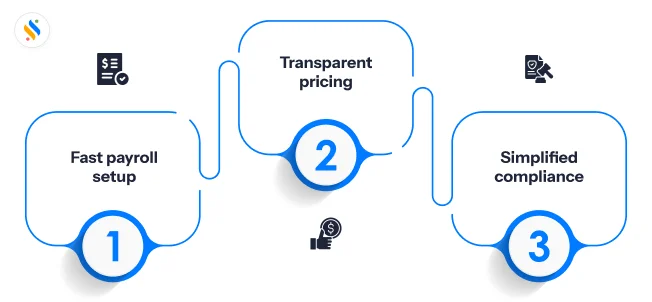
For small businesses, it comes down to three things:
Fast setup:
You shouldn’t need weeks of implementation to run your first payroll cycle.
Straightforward pricing:
Per-employee pricing that doesn’t jump sharply as headcount grows.
Compliance without a specialist:
Most small businesses don’t have a dedicated payroll compliance officer, so the software needs to handle PF, ESI, and TDS updates on its own.
A small business doesn’t need every enterprise feature. It needs payroll that’s accurate on day one, doesn’t require a training session to use, and scales without forcing a platform switch two years later.
Payroll Software vs Manual Payroll vs Outsourcing
Businesses generally choose between three payroll management systems. Here’s what they actually are:
Why is India-specific compliance not optional?
Payroll in India isn’t just about calculating a number and paying it. It runs through some of the country’s strictest data and labour regulations, and payroll software needs to be built around them, not adapted to them later.
Payroll data includes salary, bank details, PAN, and Aadhaar — all classified as personal data under the DPDP Act, 2023. A payroll system needs consent-based data handling and secure storage, not just a login screen. Older frameworks like the IT Act, 2000 and the SPDI Rules still apply to how sensitive financial data is stored and transmitted, and the judgment by the Supreme Court established the constitutional basis for treating this kind of data as private in the first place.
On the calculation side, PF, ESI, professional tax, and TDS rates are revised periodically. Payroll software that doesn’t update these automatically puts the compliance burden right back on your HR team — which defeats the point of using software at all. A reliable payroll system should support accurate payroll calculations and help businesses ensure compliance with applicable tax laws and statutory requirements.
How to choose the payroll software for your business?
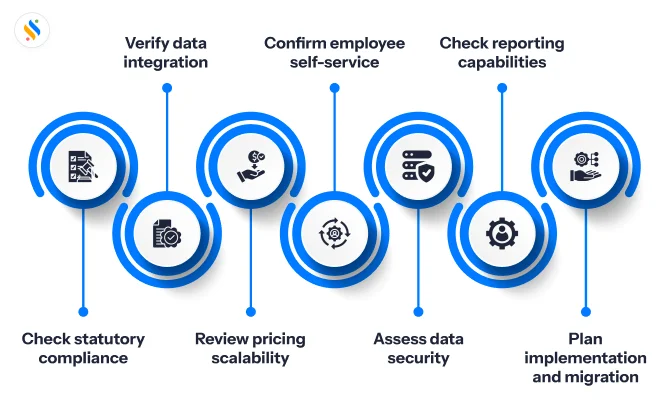
Once you’ve shortlisted a few options, evaluate them against this checklist:
- Does it handle PF, ESI, TDS, and PT efficiently?
- Does the attendance and leave data go directly into the system or needs to be exported via spreadsheets?
- Is the pricing per-employee and predictable as your headcount grows?
- Does it offer an employee self-service portal?
- Is the data secure, collected with consent and following the right storage practices?
- Can it generate an audit trail and compliance reports?
- What’s the timeline of implementation, and does the vendor support migration?
The best payroll management software should also fit into your existing business systems and support your broader HR and payroll operations as your organization grows.
Where does Super Payroll fit perfectly well?
An exceptional module of Superworks, Super Payroll is built around this exact gap. It automates statutory compliance for PF, ESI, TDS, and professional tax, handles your data in line with the DPDP Act, and gives employees a self-service portal they’ll actually use without the setup overhead that slows most small and mid-sized teams down.
As a payroll processing software, it helps businesses streamline salary processing, manage payroll data, and reduce the manual work involved in recurring payroll operations.
Conclusion
By now, you must have understood what payroll software is. Earlier, for businesses, it was a stress to process payroll and compliance through spreadsheets. A huge amount of HRs’ time used to go to managing attendance and leave sheets, fixing payslip errors, cross-checking compliance documents, managing bonus and loan documents, and whatnot.
But all of it has changed with the emergence of payroll software. At its core, it’s an innovative response to the manual way of processing payroll and taking care of compliance. With it, the attendance data, leave data, bonus, expenses, and reimbursement flow straight into the system.
From there, the software takes over the heavy lifting. It calculates PF, ESI, TDS, and professional tax on its own, applies the latest rates without anyone tracking a notification, and turns out accurate payslips every single cycle. What used to take days now gets done in minutes. This is how payroll software saves time while supporting payroll accuracy and more efficient payroll management.
The best part of having payroll software is that whether the business is a startup, a mid-sized business, or a growing enterprise, the software takes care of the entire process.
And when it comes to choosing payroll software for your business, it is essential that you are aware of the factors that can help you get the right one. This is exactly where Super Payroll stands out. The platform automates and streamlines your entire payroll and compliance, so that you don’t have to maintain any spreadsheets anymore. Apart from this, it keeps your data secure, and because it seamlessly integrates with Super HRMS, it offers employees a self-service portal. This way, employees can perform certain tasks like view/downloading payslips or generating Form 16 on their own.
So, if payroll is still eating up your HR team’s time every month, it’s time to give a shot to Super Payroll. Book a demo now!
Table Of Content
Recent Things

