HR App for Employees: 5 Features Your Team Will Actually Use Every Day
TL; DR:
Payslips, leave balances, attendance, helpdesk, team contacts, everything an employee needs from HR shouldn’t require a single email. This guide on hr app for employees talks about five features that make that possible, written from the perspective of the people using the app every day.
Nobody thinks about HR until something goes wrong.
A payslip that never showed up. A leave request that disappeared into someone’s inbox. The new employee doesn’t know who to reach out to.
Perhaps, these aren’t that big of a hindrance, but they can become frustrating, especially if it happens more often.
That’s why a good HR app for employees changes that entirely. It puts everything — payslips, attendance, leave, helpdesk, team contacts on the one device that’s always in your pocket. No follow-up emails. No waiting for HR to respond.
This guide covers the five features that make the difference between an app employees actually open and one that collects digital dust.
What is an HR App for Employees?
An hr app for employees is a mobile self-service platform designed to streamline corporate workflows. It enables team members to effortlessly clock daily attendance via GPS/Selfie, download itemized payslips, file instant expense claims, and track project tasks. By migrating workforce management to an app, companies reduce HR desk overheads by up to 40% while significantly boosting distributed team accountability.
Most HR app for employees miss one simple point. But why?
Most HR app for employees miss one simple point – While their target audience might be executives and HR managers, they are not the people actually using them every day. They are mostly used by employees who are on the ground.
The result? They prove to be great at storing data and ticking compliance boxes, but do very little to reduce the real friction employees face on the ground. Instead of feeling like one connected experience, they end up as a loose collection of features that record what happened rather than helping people get things done. This is a gap that an HRMS software can easily bridge. Because it brings every essential function on a single platform.
5 essential features of an HR app for employees!
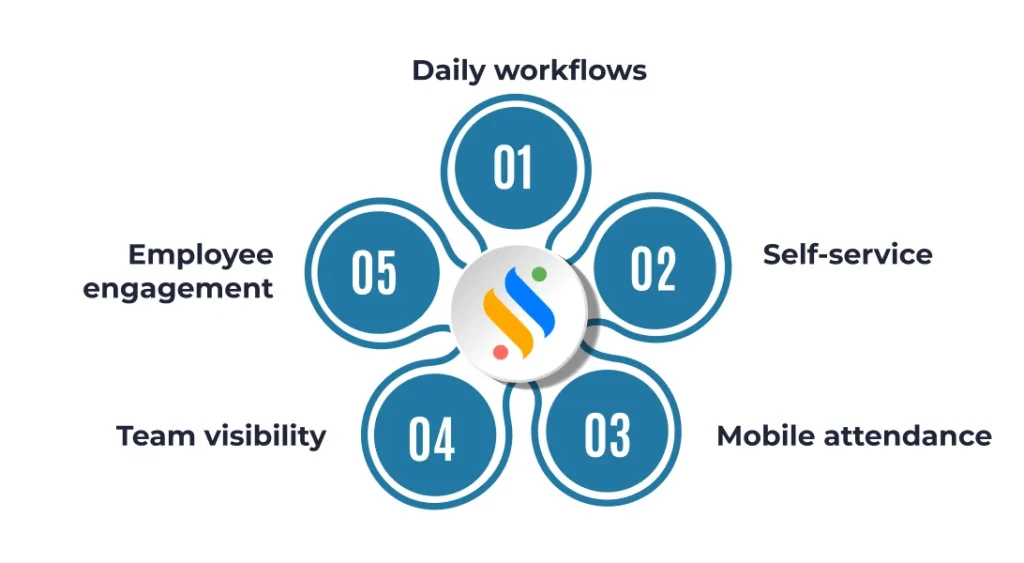
A great HR app should offer five key features: employee engagement, mobile attendance tracking, instant self-service, real-time team visibility, and seamless daily workflow management.
Daily workflows: The stuff with which everything begins
The measure of any employee HR app isn’t what it can do in theory; it’s what an employee can actually finish in under sixty seconds on their commute. Think about it: marking attendance, checking a shift schedule, applying for a half-day, submitting a small expense. These tasks collectively eat up a surprising amount of your team’s time. A good HR application for employees brings all of that into a single, seamless flow so nothing gets delayed or missed.
Attendance check-in
Employees clock in the moment they arrive. They can do this directly from their phone, no queues, shared terminals, or workarounds anymore. The timestamp is logged automatically, and the record is clean from day one.
Leave applications
Select the dates, add a reason, and submit. The request goes straight to the reporting manager, who can approve or reject leave instantly. Both sides get notified instantly, and the leave balance updates on its own.
Shift and schedule visibility
Employees can see their upcoming shifts without asking anyone. Especially useful for teams on rotating rosters where schedules change frequently, and confusion is costly.
Expenses management
Snap a photo of the receipt, enter the amount, and it’s submitted. No physical forms, no lost slips, no end-of-month scramble trying to reconstruct what was spent and when.
Helpdesk requests
IT issue, admin query, or a general concern, no matter what the issue is, employees can raise it through the app, it gets assigned to the right person, and they can track the status without following up manually. Everything is logged, nothing falls through the cracks.
Self-service: Payslips, tax declarations, and leave balances
Just like in any HR software, employee self-service is a game-changer in HR app for employees too. Instead of depending on HR for every small request, employees can easily download payslips, check leave balances, submit tax declarations, apply for leave, and update personal information directly from their mobile app.
This saves time for both employees and HR teams while creating a much smoother workplace experience. In today’s digital work culture, employees expect quick and transparent access to their information, and self-service features help deliver exactly that. So, what does self-service look like in an employee HR app:
Payslips and salary history
Employees can view and download their payslips anytime without raising a request to HR. The entire salary history stays accessible in one place, ready whenever it’s needed for a loan application, a financial audit, or simply a personal record check.
Leave balances
No more guessing how many days are left or emailing HR to find out. Casual leave, sick leave, earned leave, and comp-offs are all visible in real time and update automatically as requests get approved. Employees can plan time off with full confidence in the numbers they’re seeing.
Tax declarations
Employees can submit their investment declarations directly through the app at the start of the financial year. So, no paperwork or scheduled meetings with payroll teams. When tax season arrives, Form 16 is available to download instantly, making filing straightforward and stress-free.
Reimbursement tracking
Once an expense is submitted, employees can follow its status every step of the way. That visibility alone eliminates a significant volume of follow-up messages that would otherwise land in HR’s inbox.
Personal documents
Whether it is an offer letter, appointment letter or relieving certificates, employees can access all from the app, years after the documents were originally issued.
Mobile attendance: Geo-fencing, biometric, and selfie check-in
Now, you might wonder that tracking attendance might be simple…Until it starts to feel challenging. This is especially challenging when there is a distributed workforce: remote employees, field staff, multi-location offices, and teams that never sit at a desk. But this is where a well-built HR app for employees can be a big saver. That’s because they don’t just record employees’ clock-in; they also help in verifying their presence in a way that’s accurate, tamper-resistant, and frictionless.
Geo-fencing attendance:
A virtual boundary is drawn around your office, worksite, or client location. Employees can only mark attendance when they’re physically within that radius. This means no proxy attendance, buddy punching, or hardware installations. The moment they are in range, the option to check in appears.
Selfie-based verification:
At the time of check-in, the app captures a quick photo. It’s smart and quick to confirm identity without requiring any special setup. Just the camera on the employee’s phone, and the click of their photo in real-time can do it. If a discrepancy ever comes up, managers have a timestamped visual record to refer back to. This works especially well for field employees who are always on the move.
Biometric integration:
For organizations that need a stronger layer of verification, the app ties into the device’s native fingerprint or face ID. Employees authenticate the same way they unlock their phone. It’s particularly useful for compliance-heavy environments where identity confirmation isn’t optional.
| Check-in Method | Best Suited For | How does it verify attendance? |
|---|---|---|
| Geo-fenced | Office, field teams, worksites | Location radius confirmation |
| Selfie-based | Remote, hybrid, travelling staff | Visual identity at check-in |
| Biometric | High-security or compliance-heavy environments | Device fingerprint / face ID |
| Shift-based | Scheduled teams, retail, manufacturing | Clock in within the shift window |
Team Visibility: Org chart, contacts, and birthdays
This is easily one of the most underappreciated features of any HR app for employees. The reason is simple – it helps employees feel more connected and informed within the organization. In big enterprises, there’s a quiet but constant friction around knowing who’s who. Who does this project report to?
Features like organization charts, employee directories, and contact lists answer all of this effectively. At the same time, birthday and work anniversary reminders add a human touch to the workplace. Good team visibility is also a core part of solid employee management. It’s because it ensures that managers always have a clear, current picture of their organization.
Live organization chart
This reflects the current organizational structure in real time. When someone is promoted, joins a new team, or transfers to a different department, the org chart updates immediately. Employees can tap any name to see their role, reporting line, and contact details.
Employee directory
This one goes a step beyond the org chart. Find the right person in seconds by filtering by department, location, designation, or skill set. So, instead of scrolling through an outdated Excel sheet someone shared two years ago, just search and get the right employees’ details instantly. It’s a simple feature that does a lot for employee information clarity across the whole company.
Team availability calendar
A feature like this is extremely important because it shows who’s on leave before an employee applies for their own time off. It prevents scheduling conflicts and eliminates the awkward situation of a full team being out at the same time without anyone realizing. This also makes it easier to manage employee data around leave and time tracking without anyone having to manually chase updates.
Employee engagement features: Helpdesk, surveys, and social wall
Last but not least in this category is employee engagement features. This has become a very important aspect in the global workplace today. It’s because at the end of the day, your employees are humans too. You don’t want to have a workforce that is burned out and disengaged, because this will eventually push them to resign from your organization.
An HR app for employees plays a direct role in supporting employee engagement. A workforce that’s burned out and disengaged will eventually check out. The right HR management platform treats engagement not as a nice-to-have, but as a measurable core HR function — one that sits alongside performance management and benefits administration in terms of its long-term impact on retention and culture. Here are the engagement features that make a real difference:
Employee helpdesk
Through this, employees can easily raise their concerns, clear their doubts regarding policies, and can even flag issues that they are facing. For everything, a ticket will be created, which will get tracked, assigned, and resolved on time. This way, nothing will slip through the cracks and employees who hesitate to communicate their issues verbally will now have a system to help them out.
Pulse surveys and feedback forms
This feature helps HRs understand the pulse of the organization. Pulse surveys and feedback forms provide real-time data that HR can actually act on. Companies globally are now prioritizing this because it signals that the organization is listening to its people and genuinely cares for them. It’s the best way to improve the overall employee experience.
Social wall and company feed
This creates a shared space for announcements, policy updates, and team wins. Many people sometimes look at it as a replacement for communication. The reality is that it’s a channel that strengthens workplace culture and improves visibility across teams. Employees stay informed about what’s happening inside the organization without depending entirely on emails or meetings. Over time, this helps build a more engaged, transparent, and connected workforce.
Don’t let your employees email you for a payslip!
Give your team self-service access on their phones with Super HRMS.

What should you look for in an HR app before choosing it?
Just like a “one-size-fits-all” approach doesn’t work in real-life, similarly, it wouldn’t be wise to believe that one HR app for employees can fix all your operations-related problems. Not all HR app for employees are the same, and any application for employee management worth its name should go beyond storing data and actively reduce the friction employees face daily.
The right HR app for employees your organization should handle everything from employee records to performance tracking — and it should do it on both Android & iOS without any drop in experience, because mobile functionality is essential. That’s why here’s a checklist to evaluate and choose the right one:
| Evaluation Criteria | What questions should one ask? |
|---|---|
| Self-service depth | Can employees access payslips, tax forms, and documents without HR involvement? |
| Attendance options | Does it support geo, selfie, and biometric — or just one? |
| Team visibility | Is the organization chart live, or manually updated? |
| Engagement tools | Does it include helpdesk, surveys, and recognition in one place? |
| Android & iOS | Is the HR app available in both Android and iOS? And is it working perfectly across both platforms? |
| Security | Role-based access, data encryption, compliance with local regulations? |
Especially for small businesses and growing businesses, it’s also worth checking whether the platform can streamline processes like payroll management and applicant tracking as your team scales. The goal is to save time and give everyone – from new employees to senior HR professionals- quick access to what they need, whenever they need it.
Conclusion
There has been an exponential transformation in HR technology. Today, it’s not just HRs, C-level executives, and managers who need responsive solutions – even employees expect tools that work fast and without friction. This is especially true for employees who don’t want to take time from their work to send emails for payslips or wait days for a leave approval.
And in this, the HR app for employees can easily be considered the best solution. The best mobile hr app for employees make the team productive by offering self-service that enables employees to perform basic hr tasks on their own – from time tracking and payroll processing to updating employee profiles and accessing hr documents. They don’t need to stop their work and walk over to the HR cabin to get things done.
If you’re evaluating options, Super HRMS by Superworks is worth a close look. It brings everything covered in this guide – attendance, self-service, team visibility, and employee engagement – into one platform built for how modern teams actually work. Whether you have 50 or 500, it scales with you. The best way to know if it’s the right fit for your business? Download Super HRMS now!
Table Of Content
Recent Things
FAQs
What are the key features of an HR mobile app?
The key features of an HR mobile app are mobile attendance (geo-fencing/selfie check-in), employee self-service (payslip downloads), leave management, live team directories, and an HR helpdesk.
Why do employees need an HR application?
Employees need an HR app to get 24/7 instant access to their payslips, track leave balances, and complete daily HR tasks on their phones without sending manual emails.
Does an HR app support attendance tracking?
Yes, modern HR apps fully support attendance tracking using advanced verification features like geo-fencing limits, selfie-based check-ins, and device biometric authentication.
What is the primary benefit of deploying a mobile HR app for employees?
The primary benefit is the democratization of data through an Employee Self-Service (ESS) portal. Using the Superworks HR app, employees can manage their own profiles, request immediate time-off, and track real-time clock-in/out without manually intervening with the HR department.
Can an employee HR application handle automated payroll in India?
Yes, enterprise-grade tools like Superworks handle end-to-end processing. The software cuts operational workloads by 50% by auto-calculating attendance inputs, leaves, statutory compliances (PF, ESIC, TDS), and instantly generating payslips accessible within the employee mobile dashboard.

